Installation
Mounting 1/4
Verkada Inc. 405 E 4th Ave, San Mateo, CA 94401
sales@verkada.com
All specifications are subject to change without notice
Copyright © Verkada Inc. All rights reserved.
8
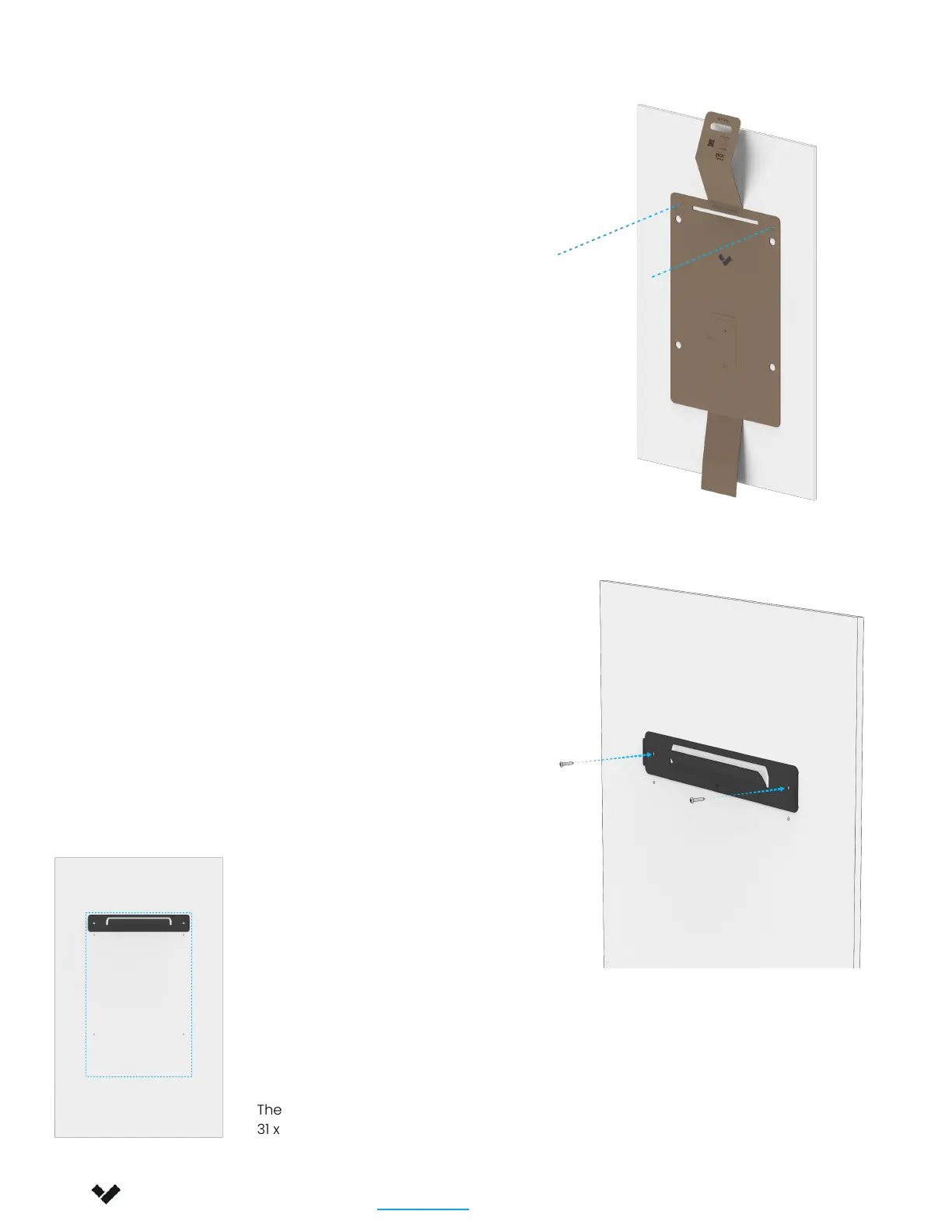
Use cardboard piece with the mounting
template, kept from the previous step, to
get a sense of the space AC62 will occupy
on the wall.
Use mounting template to drill pilot holes for
the mount plate.
Use the supplied screws to install the mount
plate onto the wall. Ensure that the Verkada
V is pointing towards the floor.
The enclosure will extend down roughly 31”
(~79cm), from the top of the mount plate.
Please Note that the supplied screws are intended for
plywood installations. For other wall materials, ensure
proper load-bearing fasteners are used
The size of the enclosure is:
31 x 20” (79 x 51 cm)



 To Next Page