Verkada Inc. 405 E 4th Ave, San Mateo, CA, 94401
sales@verkada.com
All specications are subject to change without notice.
Copyright © Verkada Inc . All rights reserved.
Connecting a Door
Installation
4. Connecting the Reader
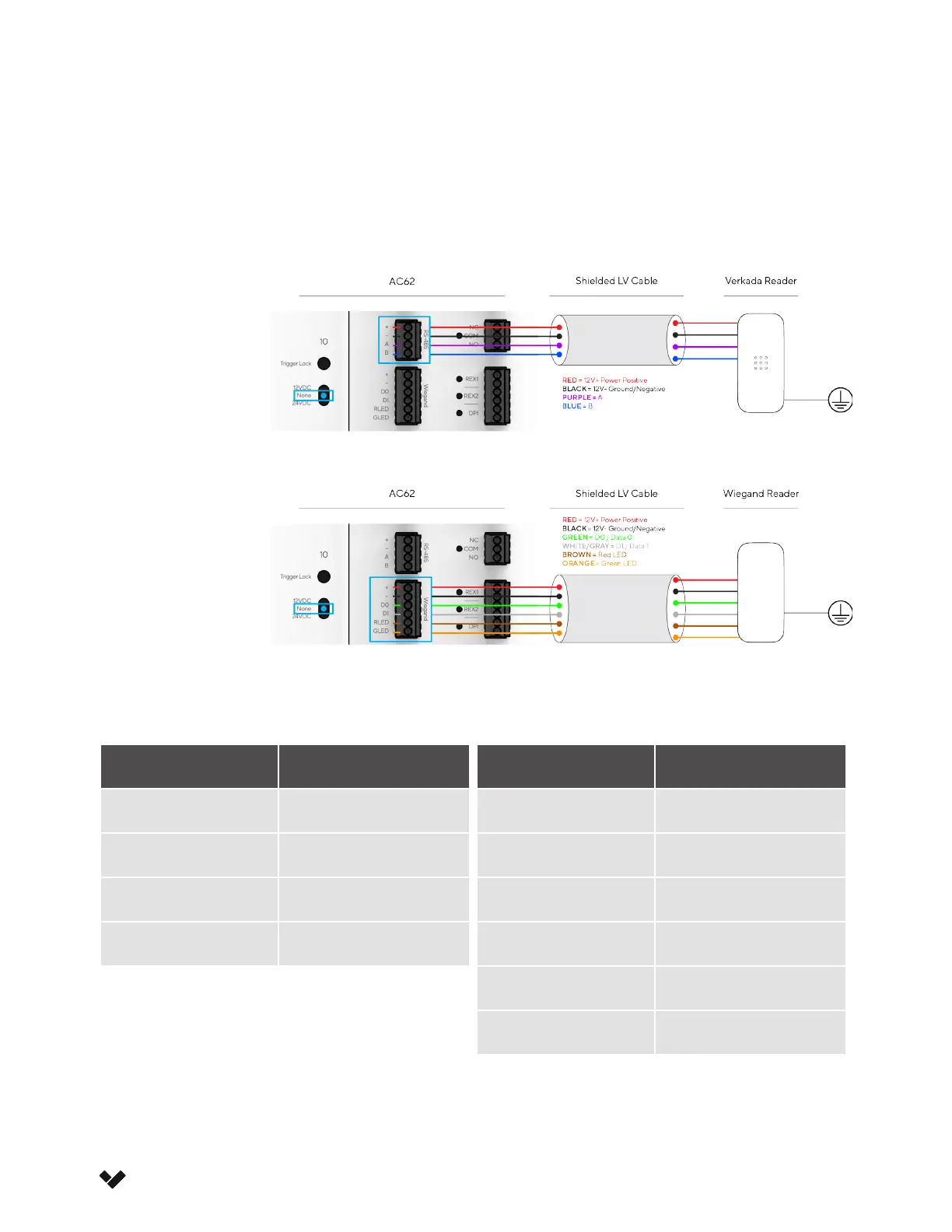
The AC62 is rated to power readers at 12V up to 250mA via the + (VIN) and – (GND) connection. Verkada
readers use the top 4-port inputs while Standard Wiegand readers use the bottom 6-port inputs. The drain
wire of the shielded cable should be secure to the nearest AC62 chassis ground.
Verkada
Reader
Standard
Wiegand
Reader
Verkada Reader Wiegand Reader
Wire Color Signal
Red 12V Power +
Black 12V Power -
Purple A
Blue B
Wire Color Signal
Red 12V Power +
Black 12V Power -
Green Data 0
White/Gray Data 1
Brown Red LED
Orange Green LED



 To Next Page