Verkada Inc. 405 E 4th Ave, San Mateo, CA, 94401
sales@verkada.com
All specications are subject to change without notice.
Copyright © Verkada Inc . All rights reserved.
Connecting a Door
Installation
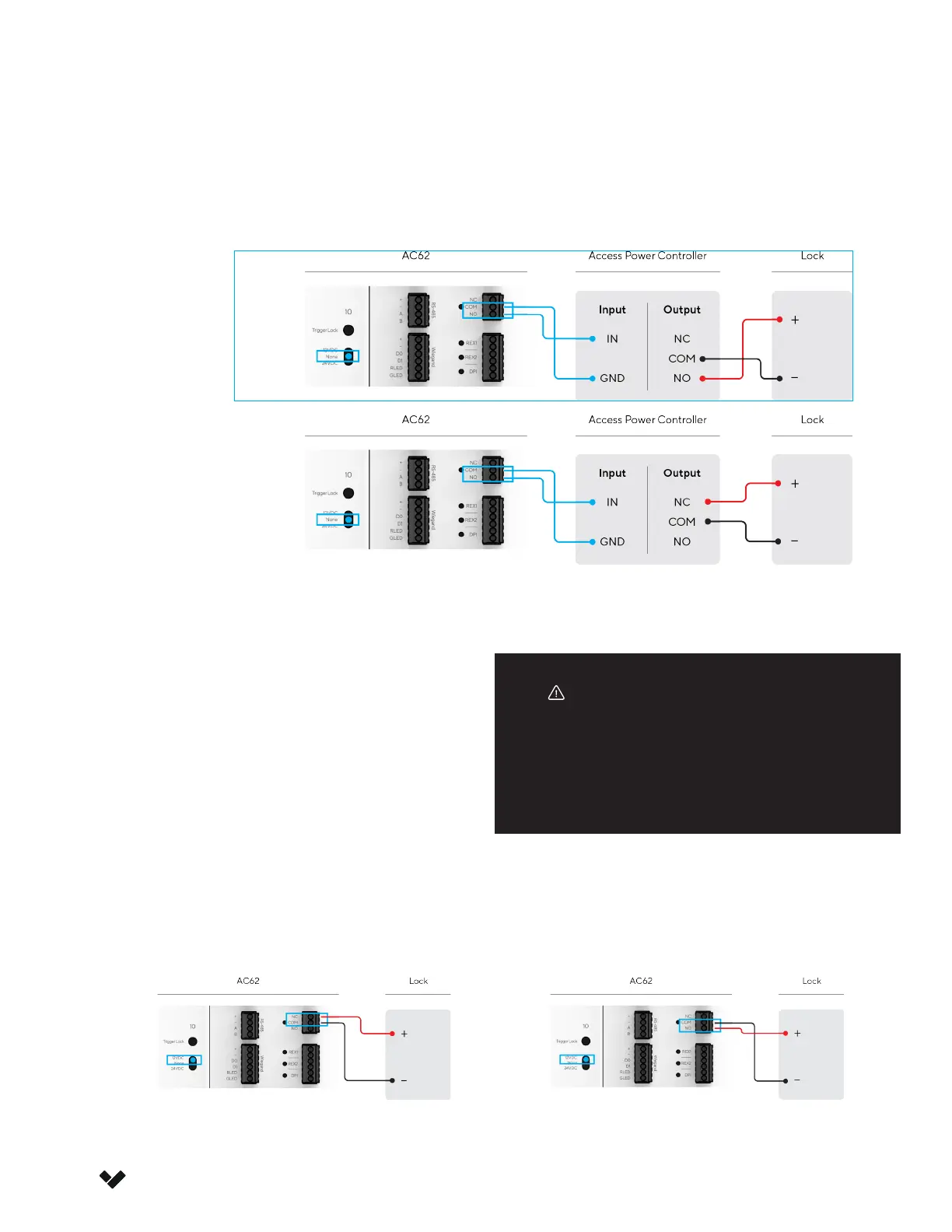
3a. Connect the Lock (Dry)
When using an extend power supply which uses a dry contact, ensure that “NONE” is selected on the door
power selection switch.
3b. Connect the Lock (Wet)
In a Wet conguration, ensure that power selection
for each door is set to the correct voltage as
outlined by the locking hardware specications.
• Set it to “12VDC” for 12 Volt locking hardware
• Set it to “24VDC” for 24 Volt locking hardware
The AC62 is rated to power 12V locks up to 1A and
24V locks up to 500mA.
Fail Safe
LOCK (+) positive goes into NC
LOCK (-) negative and ground wire goes into COM
Fail Secure
LOCK (+) positive goes into NO
LOCK (-) negative and ground wire goes into COM
When connecting the lock in the WET
conguration, ensure the negative of the
lock goes into the COM port as shown in the
diagrams below.
Warning
Fail Secure
Fail Safe



 To Next Page