
 Need help?
Do you have a question about the VersaDesk Ultralite and is the answer not in the manual?
Connect the riser's cable to the power supply and plug the unit into a power outlet.
Press the button to raise the top surface of the desk riser to its maximum height.
Insert 4 thumb screws halfway, leaving a 1/4" gap between the screw and the top surface.
Angle keyboard surface, align slots with thumb screws, pass behind front plate, and position horizontally.
Slide keyboard tray brackets into the gap and fully tighten all 4 thumb screws.
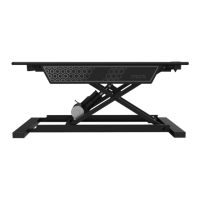
The Versadesk Ultralite is an electric standing desk converter designed to transform an existing desk or table into an ergonomic sit-stand workstation. This device allows users to easily adjust the height of their monitor and keyboard, promoting better posture and reducing the strain associated with prolonged sitting.
The primary function of the Versadesk Ultralite is to provide on-demand height adjustability for a computer workstation. It features an electric motor that facilitates smooth and effortless transitions between sitting and standing positions. The unit consists of a main desktop riser and an attachable keyboard tray, both of which move in tandem to maintain a consistent ergonomic setup. The electric lift mechanism is controlled by simple up and down buttons, making height adjustments intuitive and quick. This converter is ideal for users who want to incorporate more movement into their workday without replacing their entire desk.
While specific dimensions and weight capacities are not explicitly detailed in the provided manual, the Versadesk Ultralite is designed to accommodate standard monitor and keyboard setups. The electric motor ensures a stable and consistent lift, and the power supply connects to a standard power outlet. The design emphasizes a compact footprint, allowing it to fit on most desks or tables. The construction appears robust, utilizing metal components for the frame and brackets, suggesting durability and stability during operation. The inclusion of thumb screws for assembly indicates a design focused on user-friendly setup and potential disassembly for relocation.
The manual does not explicitly detail ongoing maintenance features, but the design suggests a low-maintenance product.
In summary, the Versadesk Ultralite is a practical and user-friendly electric standing desk converter that offers a convenient way to integrate ergonomic height adjustability into any workspace. Its electric lift, easy assembly, and stable design make it a valuable tool for promoting a healthier and more dynamic work environment.
 General
| Brand | VersaDesk |
|---|---|
| Model | Ultralite |
| Category | Indoor Furnishing |
| Language | English |

 To Next Page