Need help?
Do you have a question about the VEVOR NS-PS6 and is the answer not in the manual?
Details power sources, battery usage, and storage recommendations for the scale.
Detailed steps for recalibrating the scale using standard weights.
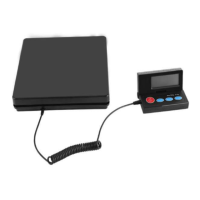
This document provides instructions for the VEVOR Shipping Scale, available in models NS-PS6 PS-400 and NS-PS7 PS-500. The scale is designed for weighing items and offers several functions to facilitate accurate measurements and ease of use.
The VEVOR Shipping Scale is a robust tool intended for weighing various objects. It operates with multiple weighing modes, including kilograms (kg), pounds (lb), ounces (oz), and pound-ounces (lb-oz), allowing users to select the most suitable unit for their needs. A key feature is its re-calibration capability, which ensures accuracy over time, especially in environments with changing temperatures or humidity. The scale also includes a "TARE" function, enabling users to subtract the weight of a container or vessel to obtain the net weight of the contents. For convenience, it has a "HOLD" function to lock the displayed weight value, preventing accidental changes or loss of data. Additionally, an "Auto lock" function can be toggled on or off using the "C/R" button, providing flexibility in how weight readings are maintained. A "PCS" (pieces) counting function is integrated, which allows the scale to count multiple items of similar weight and shape, making it useful for inventory management or batch processing.
To operate the scale, users first press the "ON/OFF" button. Once the display shows "0.00", the scale is ready for use. The "MODE" button is used to cycle through the different weighing units (kg, lb, oz, lb-oz). For tare operations, the "TARE" button is pressed after placing an empty container on the platform, which zeros the display. The "HOLD" button can be used to freeze the current weight reading on the display. If the "Auto lock" function is desired, the "C/R" button can be pressed to activate it; pressing it again will deactivate it, requiring the "HOLD" button to manually lock screen data.
The "PCS" counting function is initiated by pressing the "ON/OFF" button to turn on the scale, then pressing the "PCS" button until "0 pc" is displayed. Pressing "PCS" again will show "PC 25". At this point, users should place 25 equivalent objects of similar shape and weight on the weighing platform. It's crucial that the total weight of these objects does not exceed the scale's weighing capacity. After placing the objects, pressing the "PCS" button once more completes the setup, and the scale will store the weight of 25 pieces in its memory. This process can be repeated for 50 or 100 pieces, depending on the user's requirements.
The VEVOR Shipping Scale is designed for straightforward maintenance. It is powered by four AA-size batteries or an included adapter. If the scale is not going to be used for more than a month, it is recommended to remove all batteries from the battery slot to prevent potential damage from battery leakage. For cleaning, only a mild detergent should be used. Users are advised against dismantling the unit, as this can cause damage and void the warranty.
A critical maintenance aspect is re-calibration. While the scale is factory-calibrated, environmental factors like temperature and humidity changes can affect its accuracy over time. To re-calibrate, first ensure the scale is powered off. Press and hold the "ON/OFF" key until "PE xxx" is displayed, then release it. Immediately press both "ON/OFF" and "MODE" keys simultaneously until "E – 100" appears. Subsequent presses of the "MODE" key will cycle through calibration weight options: "E – 50", "E – 25", "E – 10", and "E – 5". The user should then place a standard calibration weight corresponding to the displayed digit (e.g., 10 kg for "E – 10") in the middle of the platform. Once the LED displays "Good", the calibration process is complete. The manual notes that using a heavier calibration weight can lead to greater accuracy after calibration.
Troubleshooting guidance is also provided. If the display shows "H", it indicates that the scale has been overloaded, exceeding its weight limit. If "-E" is displayed, it signifies that the batteries are low and need to be replaced, or the scale should be operated using the adapter.
 General
| Model | NS-PS6 |
|---|---|
| Display | LCD |
| Auto-off | Yes |
| Tare Function | Yes |
| Type | Digital Scale |
| Accuracy / Precision | 1 g |
| Units | lb, oz, kg, g |

 To Next Page