The DEBRIS mode is designed to detect debris while eliminating
( ignoring ) small iron pieces.
•ORNAMENTS Mode
The ORNAMENTS mode is designed to detect most kinds of metallic
ornaments.
•CUSTOM Mode
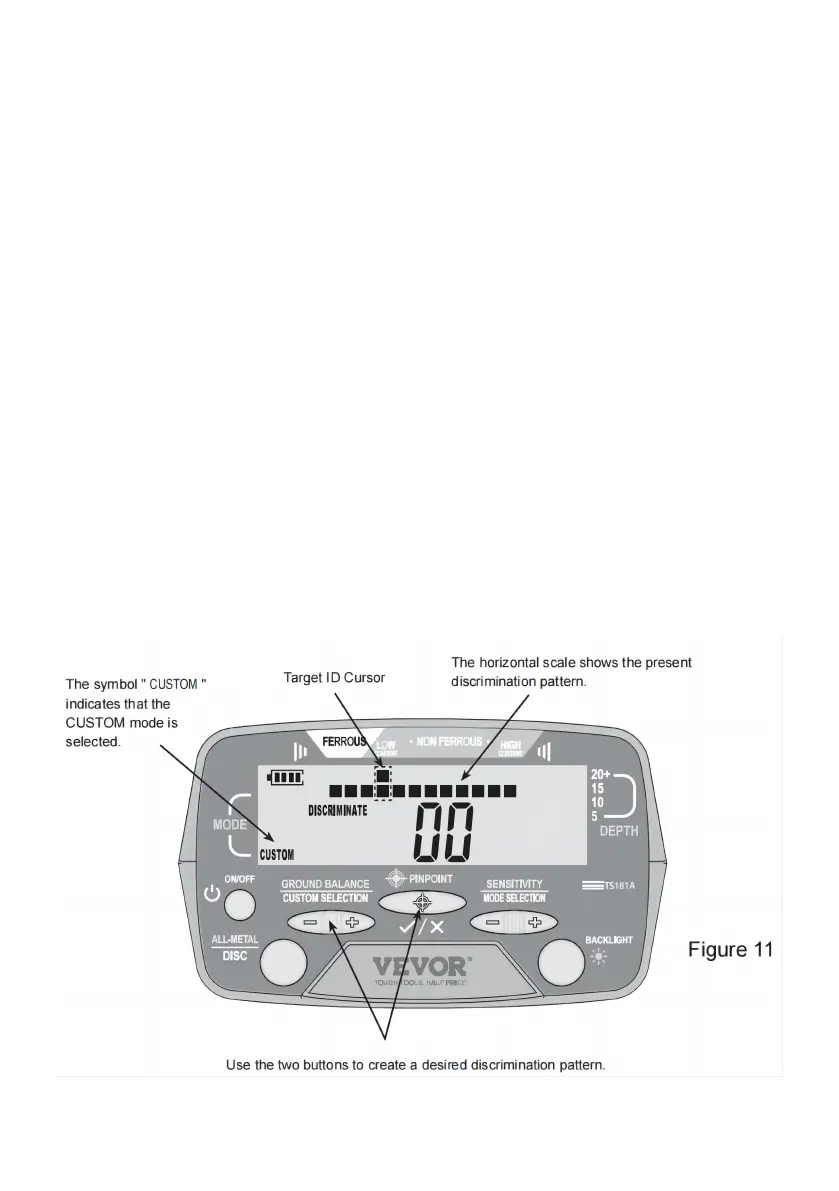
The detector has 12 pixels or " notches " of discrimination, shown on the
horizontal scale. The CUSTOM mode allows you to modifiy the present
discrimination pattern freely and create a desired discrimination pattern. To
do it, first make sure that the detector is in the CUSTOM mode and that the
search coil is far away from any metallic object and inference source. Then
press the " + " or " - " side of the "GROUND BALANCE/CUSTOM
SELECTION" button to move the Target ID Cursor to the right or left until it
is in the desired position. And then press the " PINPOINT " button to
eliminate or activate the pixel located on the horizontal scale, directly
below the Target ID Cursor. ( See Figures 11 and 12. )


 To Next Page