In CUSTOM mode, this button is used to eliminate or activate the pixel
located on the horizontal scale, directly below the Target ID Cursor.
8. "SENSITIVITY/MODE SELECTION" Button
In All Metals Mode, this "SENSITIVITY/MODE SELECTION" button is used
to adjust the detector's sensitivity.
In any Discrimination Mode, you can press the " + " side or " - " side of this
button to switch among the five Discrimination Modes.
9. " BACKLIGHT " Button
Briefly press this " BACKLIGHT " button to turn on or off the backlight.
Press and hold down this button for about 2 secs to switch the detector
between channel 0 and channel 1.
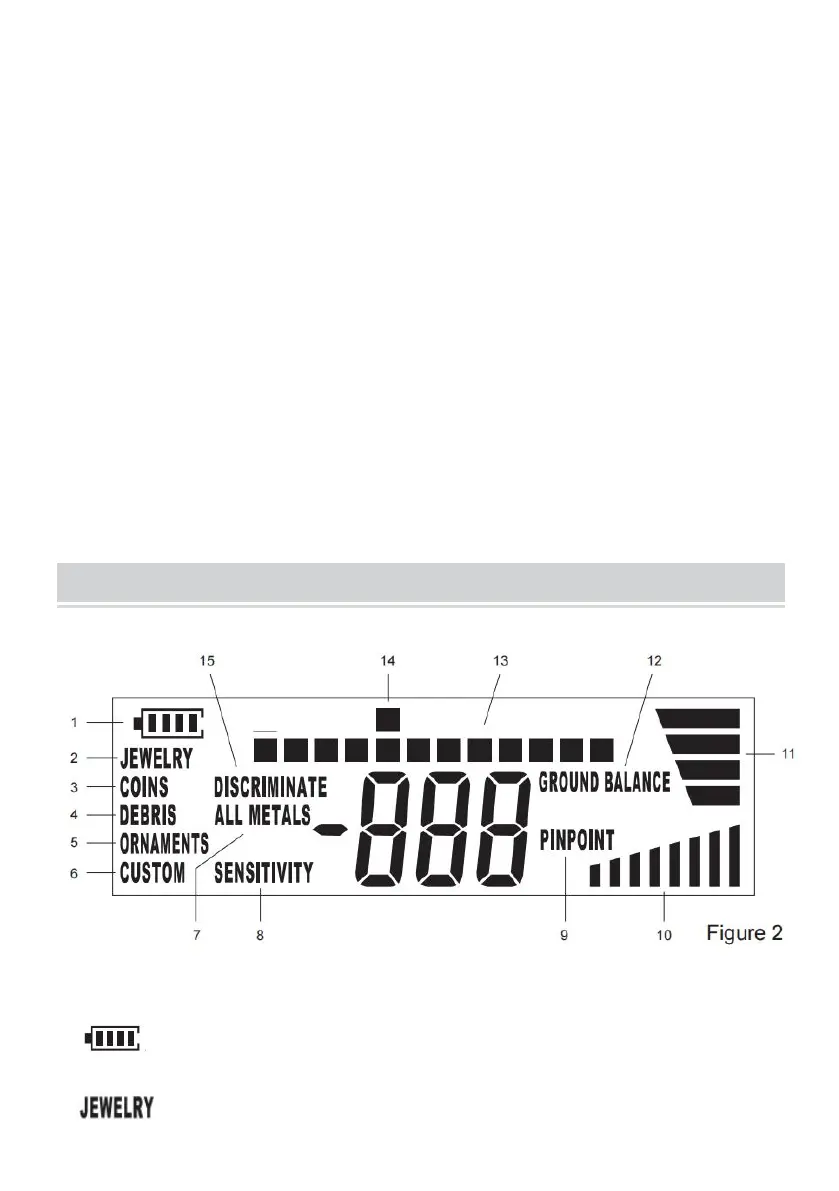
UNDERSTANDING THE DISPLAY
Explanations:
1. ......Battery level indicator.
2. ......The metal detector is in JEWELRY mode.


 To Next Page