5
." " Button.
Press and hold down this " " button for about 1 sec to turn on or off the
transmitter.
This " " button is used when you select a desired transmission code.
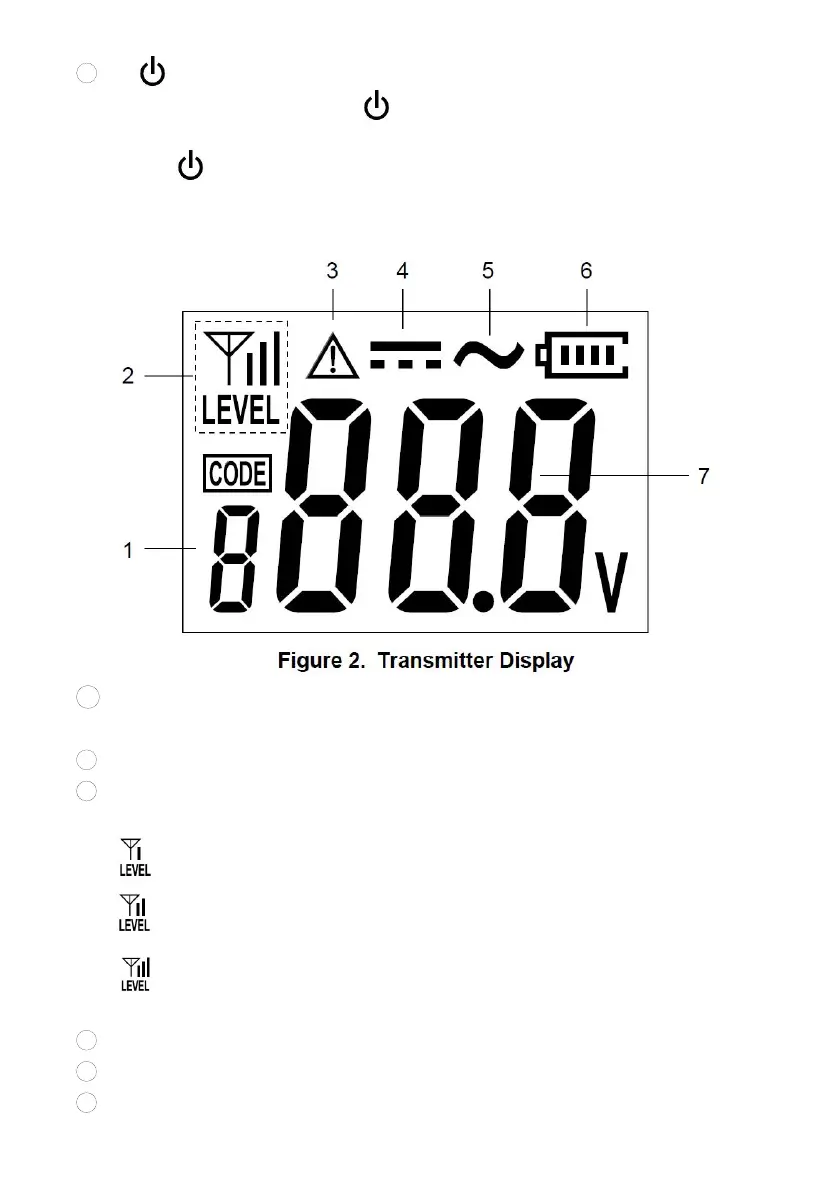
Transmitter Display
1 . Transmission code display which shows the present transmission code of
the transmitter. Transmission code is a number, such as 1, 2, 3, etc
.
2
.
Transmission level display which shows the present transmission
3
.
level of the transmitter. The higher the transmission level, the
stronger the signal being transmitted.
...... denotes that the present transmission level is level 1.
...... denotes that the present transmission level is level 2.
...... denotes that the present transmission level is level 3.
4
. Voltage alarm icon indicating that a voltage > 36V is being detected.
5
. DC symbol indicating that a DC voltage is being detected.
6
. AC symbol indicating that an AC voltage is being detected.


 To Next Page