CAUTION:
SAVE THESE INSTRUCTIONS
FOR HOUSEHOLD USE ONLY
AB:1MIN PER CYCLE
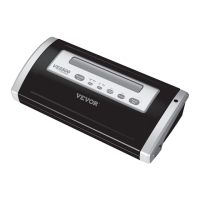
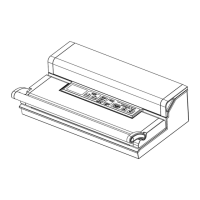
CONSTRUCTION AND FUNCTIONS
1.Vacuum&seal / Cancel:
This button has two functions depending on the machine status:
At stand-by condition, it starts the automatic operation of vacuuming the bag
and then automatically seals the bag when vacuum is complete;
At working (vacuuming or sealing operations) condition, it stops the machine.
2.Vacuum:
Two buttons for choice of different vacuum pressure:
Normal button: for regular items storage in normal vacuum pressure ;
Gentle button: for some soft & crushable items storage where less vacuum
pressure is desired.
Default setting is normal and high vacuum pressure.
3.Sealing time:
Three buttons for choosing the best bag seal time
Dry button : for dry bags and items without moisture, with a shorter heat
sealing time;
Moist button: for wet bags or foods with moisture, with normal heat sealing
time.
Extended button: for wet bags or foods with very moisture, with an extended
heat sealing time.
Default setting is for dry bags and shorter sealing time.
4.Canister:


 To Next Page