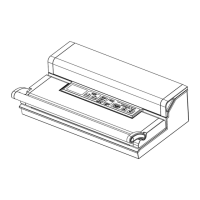
06
6. Manual Seal:
This button provides two functions:
·To seal the open end of a bag without vacuuming air suction, used to make a bag
from a bag roll;
·When the automatic “Vacuum &seal” function is in operation, this button stops the
motor pump and immediately stas to seal the bag so that less vacuum pressure
inside the bag can be controlled by the operator to avoid crushing for delicate items.
7. LED Indicators:
Indicates the status of vacuum or seal process, and the status of the machine
settings.
8.Hose po:
To inse the hose for canister and wine stopper before “marinates” or “canister”
operations.
9. Release Button:
Two provided. Press both sides simutaniously to open the cover. And release the
vacuum pressure inside the machine.
10. Air intake:
Air intake connecting vacuum chamber and pump. Do not cover this intake when
placing bag for vacuum&Seal operations.
11.Vacuum chamber:
Position the open end of the bag inside the chamber, draws air out of bag and
catches any liquid ovelow from the bag.
12. Sealing strip: Place the bag to be sealed over this strip.
13. Lower gasket:
Keep air away by forming vacuum chamber with upper gasket in the vacuum
chamber. Clean and d or replace it when it is distoed or broken.
14. Sealing element: Teon-coated heating element which is hot and seals the bag.
15. Upper gasket: Keep air away by forming vacuum chamber with lower gasket.
Clean and d or replace it when distoed or broken.
16.Bag Cutter: Press and slide in one direction or another to cut bags of a desired
size.
17. Cutter rack: Suppo the cutter to slide along


 To Next Page