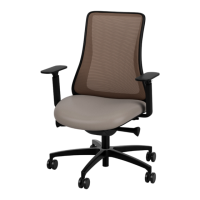
The document provides a comprehensive guide to the adjustment features of the Via Seating Genie Flex® chair, detailing its control mechanisms and various adjustable arm options.
Genie Flex® Chair Overview
The Genie Flex® chair is designed with user comfort and adjustability in mind, offering a range of mechanisms to customize the seating experience. The chair features different control mechanisms and adjustable arm types, each with specific functions to cater to individual preferences and ergonomic needs.
Control Mechanisms
The Genie Flex® chair offers three primary control mechanisms, each designed for specific user needs:
-
Auto-Adjust Body Balance #74C:
- Function: This mechanism automatically adjusts to the user's body weight, providing balanced support.
- Usage Features:
- 4-Position Tilt Limiter: A rotatable knob allows users to set the tilt limiter to one of four positions. Rotating the outer dial clockwise (forward) increases tension, while rotating it counter-clockwise (backward) decreases tension, enabling the user to control the recline resistance.
- Optional Seat Depth #12SS: A pull paddle allows for seat depth adjustment. Pulling up on the paddle while shifting weight forward moves the seat forward, and shifting weight backward moves the seat back.
- Seat Height: A pull paddle controls the seat height. To adjust, lift your weight out of the chair and pull up on the paddle. Proper seat height is achieved when the top of your legs are somewhat parallel to the floor.
- Technical Specifications: The system is designed for auto-adjustment based on body balance.
-
Quick Adjust Advanced Synchro #67C:
- Function: This advanced synchro mechanism allows for quick and precise adjustments of the back tension and tilt.
- Usage Features:
- Back Tension: A turn dial adjusts back tension. Rotating the knob right increases tension, and rotating it left decreases tension.
- 5-Position Tilt Limiter: A turn dial sets the tilt limiter to one of five positions. To recline more, turn the dial right; to recline less, turn the dial left.
- Optional Seat Depth #SS: A pull paddle allows for seat depth adjustment. Pushing down on the paddle while shifting weight forward moves the seat forward, and shifting weight backward moves the seat back.
- Seat Height: A pull paddle controls the seat height. To adjust, lift your weight out of the chair and pull up on the paddle. Proper seat height is achieved when the top of your legs are somewhat parallel to the floor.
- Optional Forward Tilt #FT: A pull paddle activates the forward tilt feature. Pushing the paddle down and leaning back in the chair will engage a click when the forward tilt mechanism has turned on. To turn off the forward tilt, lift the paddle to the up position and lean back in the chair until a click is heard, indicating the mechanism is off.
- Technical Specifications: This mechanism offers advanced synchronous movement for back and seat.
-
Stool: Auto-Adjust Body Balance #35C:
- Function: This mechanism is specifically designed for stool configurations, providing auto-adjusting body balance.
- Usage Features:
- 3-Position Tilt Limiter: A rotatable knob allows users to set the tilt limiter to one of three positions. Rotating the outer dial clockwise (forward) increases tension, while rotating it counter-clockwise (backward) decreases tension.
- Foot Ring #11DR & #11XDR: The footrest can be adjusted by pressing down on the plastic inner hub and lifting the foot ring up to unlock. Once the desired position is reached, press down on the outer footrest until the hub is in a locked position.
- Seat Height: A pull paddle controls the seat height. To adjust, lift your weight out of the chair and pull up on the paddle. Proper seat height is achieved when the top of your legs are somewhat parallel to the floor.
- Technical Specifications: Designed for stool applications with auto-adjusting body balance.
Adjustable Arms
The Genie Flex® chair offers several types of adjustable arms, each providing different levels of customization:
-
Basic Adjustable Arms #38A/#38AG:
- Function: These arms provide basic height and width adjustments.
- Usage Features:
- Arm Height (Up/Down): A button located beneath the armrest allows for height adjustment. Press the button while grasping the armrest with both hands to raise or lower each arm to the desired height. Release the button to lock the position.
- Optional Arm Width (In/Out): A switch located beneath the arm controls width adjustment. Rotate the switch forward, grasp the arm, and adjust it outwards to the desired width. Each arm adjusts separately. Rotate the switch back to its original position when finished.
- Technical Specifications: Basic height and width adjustment.
-
Roll Back Arms #39A:
- Function: These arms offer height adjustment and a unique roll-back feature for increased flexibility.
- Usage Features:
- Arm Height (Up/Down): A button located beneath the armrest allows for height adjustment. Press the button while grasping the armrest with both hands to raise or lower each arm to the desired height. Release the button to lock the position.
- Roll Back Feature: A small button on the top front of the silver circle allows the arm to roll back. Press and hold this button while grasping the arm and moving it back to a horizontal position where the arm is parallel with the floor. To lift the arm back to an upright position, simply lift it.
- Technical Specifications: Height adjustment and roll-back functionality.
-
Adjustable Arms #51A/#51AG/#52A/#53A:
- Function: These arms offer comprehensive adjustments including height, rotation, width, and back/forth movement.
- Usage Features:
- Arm Height (Up/Down): A button located beneath the armrest allows for height adjustment. Press the button while grasping the armrest with both hands to raise or lower each arm to the desired height. Release the button to lock the position.
- Optional Armrest Rotation: The armrest can be rotated left or right up to a maximum of 15 degrees each way.
- Optional Arm Width (In/Out): A switch located beneath the arm controls width adjustment. Rotate the switch forward, grasp the arm, and adjust it outwards to the desired width. Each arm adjusts separately. Rotate the switch back to its original position when finished.
- Optional Armrest Back/Forth: The armrest can be slid forward or back to the desired position, with a maximum travel of 1.5 inches.
- Technical Specifications: Multi-directional adjustment including height, 15° rotation, width, and 1.5" back/forth movement.
General Usage and Maintenance
The document emphasizes user-friendly adjustments for all features. While specific maintenance instructions are not detailed, the design suggests that regular use of the adjustment mechanisms is part of the chair's intended operation. The inclusion of online user guides (accessible via QR codes) for each specific mechanism indicates that more detailed usage and potentially maintenance information is available digitally. The consistent use of "pull paddle," "rotatable knob," "turn dial," "button," and "switch" for adjustments highlights an intuitive interface across all models.
The Genie Flex® chair series, with its various control and arm options, aims to provide a highly customizable and ergonomically sound seating solution for a wide range of users and applications, from standard office chairs to stools.

 Need help?
 General

 To Next Page