Chapter 16 Performing RFoCPRI Testing
JD700B Series User’s Guide 595
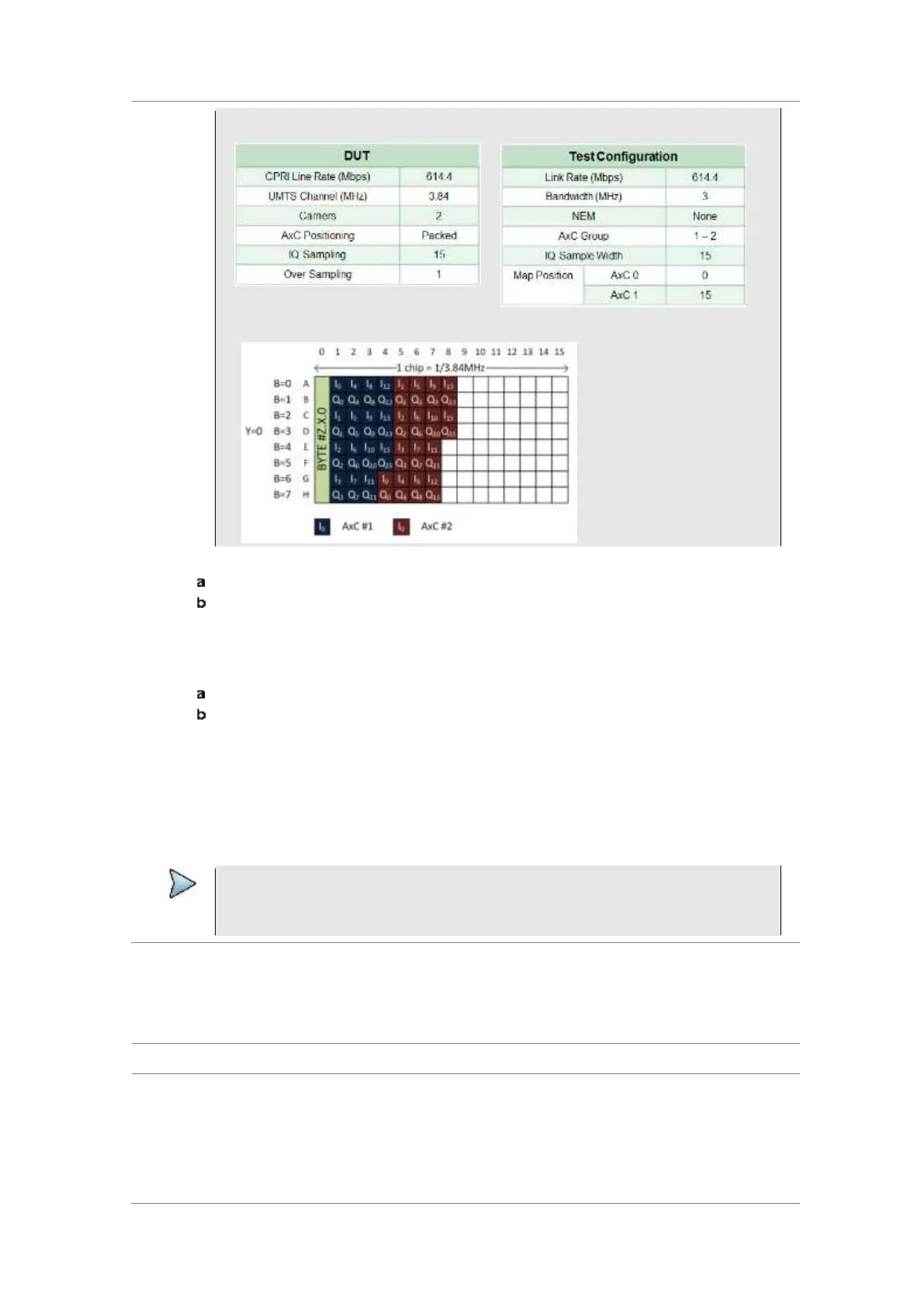
Following is an example of test configuration for a DUT.
For this test configuration, IQ allocation will be like this in the CPRI basic frame.
6 To set the bandwidth of the downlink signal, complete the following steps:
Press the Bandwidth soft key.
Select the bandwidth option from: 1.4 MHz, 3 MHz, 5 MHz, 10 MHz, 15 MHz,
15 MHz (4 AxC), 20 MHz, or 20 MHz (6 AxC).
The RBW range changes based on this bandwidth setting.
Required number of AxC containers varies depending on the selected bandwidth.
7 To use the pre-configured settings for a NEM, complete the following steps:
Press the NEM soft key.
Select an NEM from the following choices:
None (no pre-configuration)
Ericsson > Ericsson (UL) and Ericsson (DL)
Alcatel-Lucent (UL/DL)
Samsung (UL/DL)
Huawei > Huawei (UL) and Huawei (DL)
ZTE (UL/DL)
NOTE
If you have selected a NEM, the instrument sets the Map Postion and other releated
settings automatically based on the selected NEM and you cannot edit the map position
setting. The pre-configured information may be subject to changes at any times by NEMs.
Conducting spectrum measurement
Making a measurement
1 Press the MEASURE hot key to select the measurement mode.
2 Select Signal Analyzer > LTE-FDD > Spectrum.
3 Configure test parameters as described in the “Configuring test parameters” on page 592.
4 Press the MEASURE SETUP hot key, and then set the following parameters:
Measurement setups as described in the “Setting measure setup” on page 594


 To Next Page