VIAVI//Public
P5000i Microscope
P5000i Microscope
QUICK CARD
2
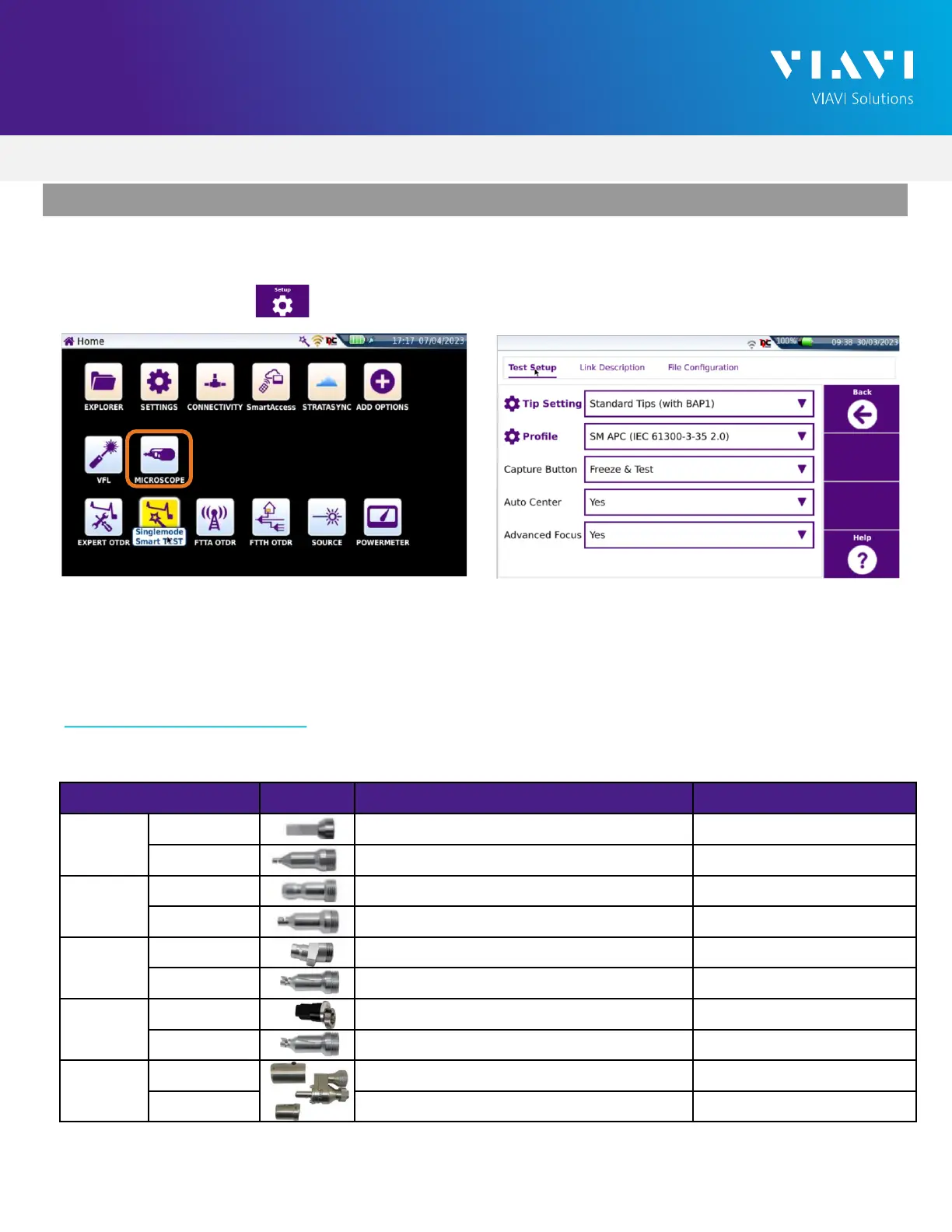
1. Press the Home button to display the home screen.
2. Tap the Microscope icon.
3. Tap the Setup soft key .
4. Configure Tip Setting and Profile per the table below. If the Tip Selection is not shown on the
SmartOTDR, connect the SmartOTDR to a PC with FiberChekPRO™ software using a USB to
MicroUSB cable and move the appropriate tip setting onto the SmartOTDR. For more information,
consult the FiberChekPRO user manual. To download FiberChekPRO to your PC, visit
http://fcpro.updatemyunit.net/.
SET UP THE P5000i
Connection Type Tip
Profile Selection
Tip Selection
LC
Bulkhead SM UPC (IEC-61300-3-35 Ed. 2.0) Standard Tips (with BAP1)
Patch Cord SM UPC (IEC-61300-3-35 Ed. 2.0) Standard Tips (with BAP1)
SC-UPC
Bulkhead SM UPC (IEC-61300-3-35 Ed. 2.0) Standard Tips (with BAP1)
Patch Cord SM UPC (IEC-61300-3-35 Ed. 2.0) Standard Tips (with BAP1)
SC-APC
Bulkhead SM APC (IEC-61300-3-35 Ed. 2.0) Standard Tips (with BAP1)
Patch Cord SM APC (IEC-61300-3-35 Ed. 2.0) Standard Tips (with BAP1)
Corning
OptiTap
Bulkhead SM APC (IEC-61300-3-35 Ed. 2.0) FBPT-COD-L
Patch Cord SM APC (IEC-61300-3-35 Ed. 2.0) Standard Tips (with BAP1)
Corning
OptiTip
Bulkhead Ribbon, SM APC (IEC-61300-3-35 Ed. 2.0) Ribbon Tips
Patch Cord Ribbon, SM APC (IEC-61300-3-35 Ed. 2.0) Ribbon Tips
Figure 5:Test SetupFigure 4:Home Screen


 To Next Page