2. Setting Rudder Servo Direction (REVERSE SWITCHES)
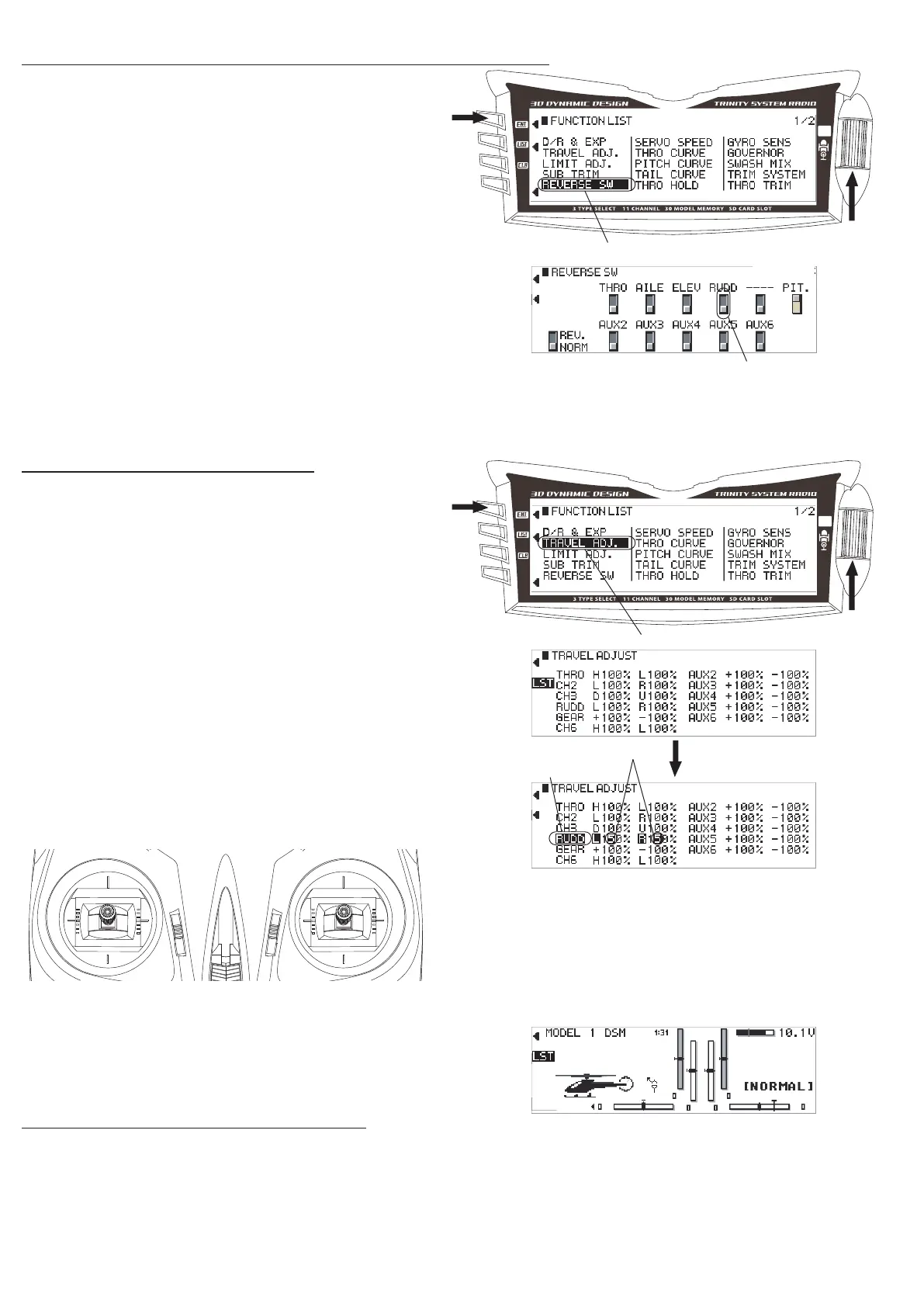
① Switch over to 「FUNCTION LIST」 by pressing the
【ENT】 key, turn the dial and select 「REVERSE SW」
then press the dial again.
② Turn the dial to 「RUDD」and reverse as necessary.
Return to 「FUNCTION LIST」 by pressing the【LST】
key.
3. Setting TRAVEL ADJ. Values
① Turn the dial to select「TRVL ADJ.」and press the
dial.
② Turn the dial to select each item and press the dial
to change each in turn.
③ Turn the dial to shift to each item and input the
number as shown in the gure.
※「Use the appropriate control stick to switch
between H/L, U/D or L/R.
④ Press the【ENT】key to return to regular screen.
Setting for other models of Radio set.
※ 1 If you use a transmitter other than the JR DSX11 (or the XG8 described below), please refer to the
manufactures instruction manual, in combination with the helicopter assembly manual.
※ 2 Please refer to your tail gyro instruction manual for advise on tail rotor setup and initial transmitter
settings.
※ 3 If you are using a FBL system other than the TAGS01, please refer to your FBL system manual.
※ Note: The rudder reverse switch direction will depend
on the servo and gyro/FBL unit used. Please refer to
your gyro/FBL unit instruction manual for further details.
※ Note that the 「THRO」 direction and travel adjust
settings will depend on the ESC used.
③ Input the number
① Select「REVERSE SW」
① Select「TRAVEL ADJ.」
①
②,③
② Select item
P.4
①,④
②,③


 To Next Page
 Loading...