P.6
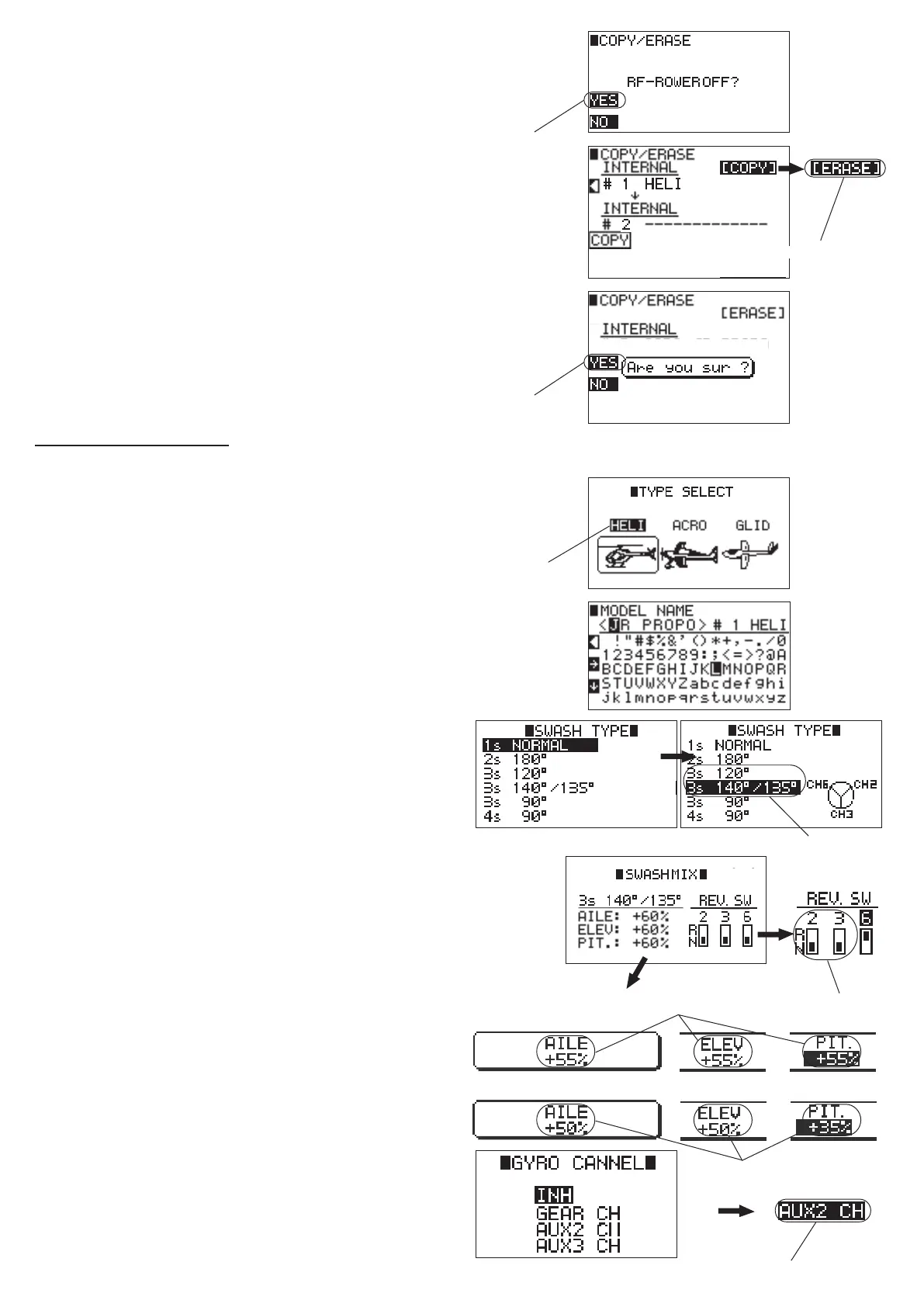
⑧「RF-POWER OFF?」is displayed.
Press the 【CLR】 key to select 「YES」.
⑨ Turn the dial to select 「COPY」 and press to
change it to 「ERASE」 then press the 【FNC】 key.
⑩「Are you sure ?」 is displayed.
Press the 【CLR】 key to select 「YES」 .
2. Navigation feature
The gure on the right is displayed automatically
when you initialized your radio or input a new
model or change the model type.
① Turn the dial to select 「HELI」 and press to set.
②「MODEL NAME」is displayed - input the model
name.
(You can skip this by pressing the 【ENT】 key)
③ Turn the dial to select 120 ゜ CCPM or 140 ゜
CCPM and press.
④ Confirm the screen shows mixing and reverse
options for the Swash type you selected.
Then turn the dial to select the swash mix item you
wish to change and press to input the value.
⑤ Turn the dial to select the reverse switch you
wish to change and press to reverse. After you
are nished, press the 【ENT】 key.
⑥「GYRO CHANNEL」- select the channel you
wish to use for gyro sensitivity and press the
dial. (select 「AUX2」 for Flybar head and select
「GEAR」 for FBL head.)
⑦ Press the 【LIST】 key twice to return to the
regular screen.
⑨ Change to 「ERASE」
⑧ Select「YES」
⑩ Select 「YES」
① Select 「HELI」
④ Input the number
④ Input the number
w/Flybar Head
FLB Head
⑤ Switch to REV
③ Choose either
120 ゜ or 140 ゜
⑥ Select 「AUX2」 for Flybar head and select 「GEAR」 for FBL head.


 To Next Page
 Loading...