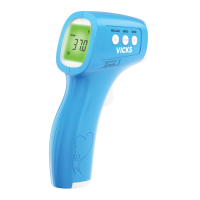
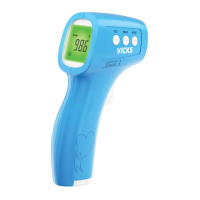
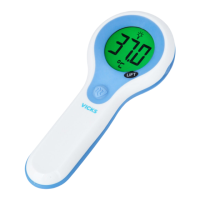
The Vicks No Touch 3-in-1 Thermometer (VNT200) is a non-sterile, reusable, clinical thermometer designed for intermittent determination of human body temperature in a "no touch" mode. It measures infrared energy radiated from the skin at the center of the forehead, converting this captured energy into a body temperature value. This device is suitable for use on people of all ages in a home environment and has been clinically tested and proven to be safe and accurate when used according to its operating instructions. Beyond human body temperature, it can also measure surface temperatures of objects like food and bath water.
Function Description
The thermometer operates by detecting infrared energy without physical contact, making it hygienic and convenient. It features an LCD screen that displays temperature readings, along with special icons and a backlight that changes color to provide temperature guidance.
- Temperature Measurement Modes: The VNT200 offers two primary measurement modes:
- Human Body Temperature Mode: Designed for measuring forehead temperature.
- Surface Temperature Mode: Used for measuring the temperature of objects, such as food or bath water.
- Temperature Guidance Feature: In human body temperature mode, the LCD backlight illuminates in different colors to indicate temperature ranges:
- Green: Normal temperature (35.8-37.4 °C / 96.4-99.4 °F).
- Yellow: Elevated temperature (>37.4-38.5 °C / >99.4-101.3 °F).
- Red: High temperature (>38.5 °C / >101.3 °F).
- For temperatures below 35.8 °C (96.4 °F), the backlight remains off.
- Audible Indicators:
- One long beep indicates a normal temperature reading.
- Four double beeps indicate an elevated or high temperature reading, or temperatures above 37.4 °C (99.4 °F).
- A confirmation beep is heard when a measurement is complete in surface temperature mode.
- A long beep is heard when clearing memory.
- Memory Function: The thermometer stores the last 10 temperature readings, which can be recalled by pressing the "MEMO" button. The most recent reading is displayed first. The memory can be cleared by pressing and holding the "MEMO" button for 4 seconds.
- Fahrenheit/Celsius Conversion: Users can switch between Fahrenheit (°F) and Celsius (°C) temperature units by pressing and holding the "MODE" button for 3 seconds, then pressing "MODE" again to toggle, and finally pressing "MEMO" to save the selection.
- Sound Mute Function: After setting the temperature unit, the device allows users to mute or unmute the sound. Press the "MODE" button to toggle between "On" and "Off" for the speaker icon, then press "MEMO" to save.
- Automatic Shut-off: To conserve battery power, the unit automatically turns off after 20 seconds of inactivity.
Usage Features
The Vicks No Touch Thermometer is designed for ease of use with simple controls and clear indicators.
- Turning On: Press the "POWER" button to turn on the device. It will be ready for measurement when four dashes appear on the LCD screen, and the temperature unit (°F or °C) and "Body" symbol are displayed.
- Positioning for Human Temperature: For accurate readings, position the thermometer 0.4-2 inches (1-5 cm) away from the center of the forehead, between the eyebrows. Ensure the area is clean and free of hair, sweat, or dirt. It is crucial to hold the thermometer and forehead steady during measurement to avoid impacting accuracy.
- Positioning for Surface Temperature: When measuring food or bath water temperature, position the thermometer 0.4-2 inches (1-5 cm) away from the surface. Ensure it is aimed directly at the substance and not at the container walls or in-line of steam. Do not touch the food or water with the thermometer.
- Taking a Measurement: Once positioned correctly, press the "POWER" button to initiate a temperature measurement.
- Reading Temperature: After the measurement is complete, the temperature reading will be displayed on the LCD screen, accompanied by an audible beep and a color-coded backlight (in human body mode). In surface temperature mode, the backlight will always be green.
- Temperature Taking Hints:
- It is important to know an individual's normal temperature when they are well by taking multiple readings.
- Ensure the individual and thermometer acclimate to the room temperature for 30 minutes before measurement.
- Always hold the thermometer and forehead steady. Do not move the thermometer until the final beep.
- Avoid taking measurements while or immediately after nursing a baby.
- Individuals should not drink, eat, or be physically active before/during measurement. Remove hats and wait 30 minutes.
- Clean the forehead area of dirt or hair and wait 10 minutes after cleaning before measurement.
- Always follow directions precisely, as incorrect positioning or distance can affect results.
- Note that this unit reads 0.5 °C (0.9 °F) lower than a rectal digital measurement.
- Safety Precautions:
- Keep out of reach of children under 12 years.
- Do not use for purposes other than intended.
- Never immerse the thermometer in water or other liquids.
- Do not store in extreme temperatures (-25 °C to 55 °C / -13 °F to 131 °F) or excessive humidity (up to 95% non-condensing).
- Do not use if there are signs of damage; do not attempt to repair.
- Never insert sharp objects into the scanner area or any other open surface.
- Protect from severe impact and shock; do not twist the instrument or sensor.
- This thermometer is for household use only and not a substitute for medical consultation.
- Do not allow children to take temperatures unattended.
- Do not modify the equipment without manufacturer authorization.
- Consult a physician if symptoms like unexplained irritability, vomiting, or changes in appetite occur, even without fever.
- Individuals on antibiotics, analgesics, or antipyretics should not be assessed solely on temperature readings.
Maintenance Features
Proper care and cleaning ensure the longevity and accuracy of the Vicks No Touch Thermometer.
- Cleaning: The thermometer should be cleaned between uses.
- Use an alcohol swab or a cotton swab moistened with 70% Isopropyl alcohol to wipe the thermometer casing and measuring probe for 90 seconds.
- Allow 10 minutes for the thermometer to air-dry before taking another measurement.
- Ensure no liquid enters the interior of the thermometer.
- Never use abrasive cleaning agents, thinners, or benzene.
- Never immerse the thermometer in water or other cleaning liquids.
- Never insert a sharp object into the scanner area or any other open surface.
- Battery Replacement: The thermometer uses two AAA batteries.
- Replace batteries when the flashing battery symbol appears on the LCD screen.
- Slide open the battery cover, remove old batteries, and insert two new AAA batteries, ensuring correct alignment according to polarity indicators.
- Remove batteries if the thermometer will not be used for an extended period to prevent damage from leakage.
- Dispose of empty batteries at appropriate collection sites according to national or local regulations.
- Storage: Store the thermometer in a safe place, away from extreme temperatures and humidity, as specified in the safety instructions.

 Need help?
 General

 To Next Page