18
Viconics Technologies
028-0465-00 October 2015
Commission BACnet/IP Front
End with JACE
This procedure shows an example on how to commission the Tridium Jace BACnet Controller with the GW2.
1. Launch Workbench.
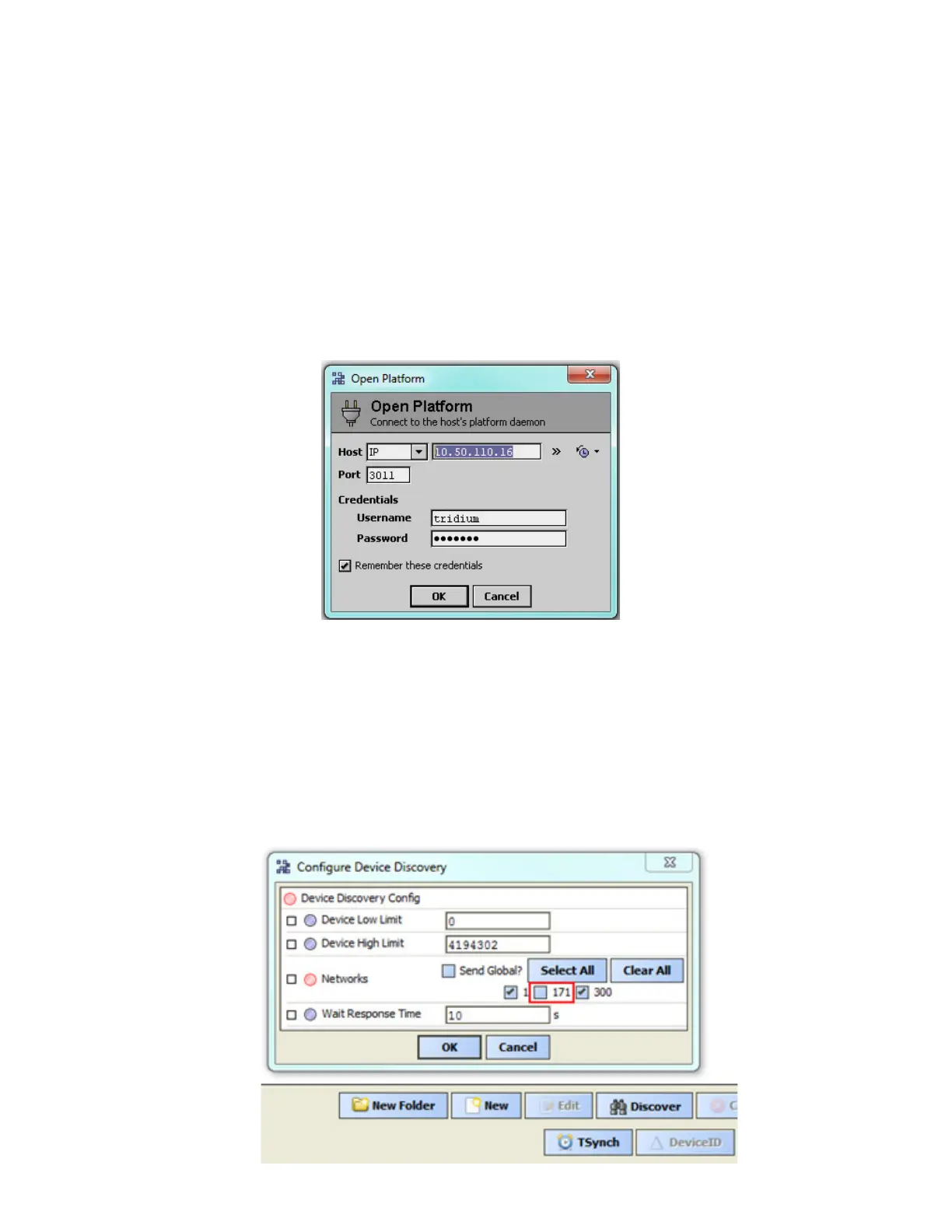
1. In Open Platform dialog box, enter IP address of your BACnet Controller.
NOTE: The IP address used in this procedure is an example. Use the IP address of the BACnet Controller or similar.
2. In Port field, enter port.
3. In Username field, enter username.
4. In Password field, enter password.
5. Click OK.
6. On BMS click Discover.
7. Do the following to Networks:
i. Untoggle Network number set for the GW2.
NOTE: In example below, 171 represents the GW2 network. If the GW2 network number stays checked, the
devices will still get discovered, however there will be duplicates. Make sure to untoggle this.
i. Toggle AX IP network number.
NOTE: in example below, AX IP number is 1.
i. Peform no action to AX MS/TP network number.
NOTE: in example below, AX MS/TP network number is 300. This number has no impact on desired result.
4. Click OK.


 To Next Page
 Loading...