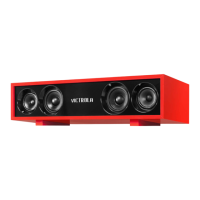
DC 5V
TF
AUX
USB
MIC
2
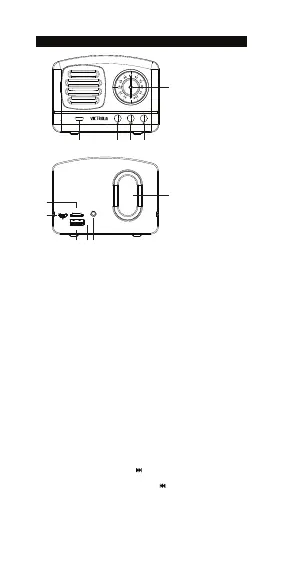
PRODUCT OVERVIEW
No. Description
1. Volume control dial -/+
2. LED indicator
3. Next button
4. Multi-Function button
5. Previous button
6. Passive subwoofer
7. AUX port
8. Microphone
9. USB port
10.
Micro USB charging port
11. Micro SD card reader
1
2 5 4 3
6
789
10
11
Unit Operation
1. ON: Press & hold multi-function button to power ON
2. Once the Unit has been turned ON, it is automatically in
Bluetooth mode
3. Insert SD card OR input audio cable to switch to
SD card or AUX mode
4. OFF: press & hold multi-function button to power OFF
Bluetooth Pairing
1. Once the unit has been turned on, it is automatically in
Bluetooth mode (blue LED will flash quickly to indicate
the speaker is ready for Wireless pairing)
2. Enable Bluetooth function on your electronic device.
3. Search Bluetooth signal “ Victrola Lily ” & pair your device
(blue LED will flash slowly to indicate the unit has been
successfully paired)
NOTE: previously paired devices will automatically re-connect to the
Lily speaker when both devices are turned on & within range.
Bluetooth Mode
1. Play/Pause: press multi-function button once
2. Volume control: turn volume dial
3. Skip songs: press next song button once
(see #3 in Product Overview)
4. Previous songs: press previous song button once
(see #5 in Product Overview)
5. Answer/end incoming calls: press multi-function button once
6. Rejecting incoming calls can be controlled directly from your
audio device


 To Next Page