EasyManua.ls Logo

VicTsing PC132A - User Manual

VicTsing PC132A
2 pages
Print Icon
To Next Page IconTo Next Page
Loading...
User manual
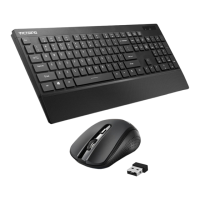
PC132A Wireless Keyboard
Product features
Adopt 2.4 G wireless solutions
Meet the appearance of the principle of human body engineering design idea
Chocolate key cap design, flexible operation, easy clean.
High quality injection silica gel, feel comfortable
Product installation
1. Take out the Wireless keyboard and receiver from the box
2.Put the Nano receiver into the USB port
3.Put 2PCS AAA alkaline battery inside the keyboard according in the correct polarity
4.LED blink a few seconds, now you can use the product
product function
1.The battery is low voltage remind function
The battery is low voltage remind function as the keyboard use time lengthen, battery voltage will slowly
lower, below the set remind voltage, in the process of use, LED light flashing red instructions appeared to
remind you to replace new batteries.
2.CAPS LOCKNUM LOCK instruction function
This product increases the CAPS LOCK and NUM LOCK instruction function, users to identify case
and the digital working condition. When LED light after the use of the keyboard, LED will be put out. The
use of the keyboard again when press any key LED to light.
Reconnect
The wireless set respectively transmit and receive a group of built-in identification number, easy to use
of products when using one-on-one. High temperature, high magnetic field, vibration, etc may make this
group of code disappear, they need to connect only can be used, the method is as follows
1.Pulling out and then to plug in the receiver;
2.Hold the "ESC" and "K" keys on the keyboard for a few seconds, and then to loosen, the low voltage
LED shining to code namely after success. You also can use wireless keyboard.
Note
1Use only AAA alkaline battery, a long time not to use products please take out the battery, in order to
avoid corrosion parts
2This product use 2.4 GHZ radio waves to transmit data, the sight range of 10 meters, if have larger
obstacles, environmental interference, use distance will be reduced.
Warning
Without the approval of the authorities responsible for any change or correction of clear users shall have
Question and Answer IconNeed help?

Do you have a question about the VicTsing PC132A and is the answer not in the manual?

Summary

Product Features Overview

Product Installation Guide

Installation Steps

Steps for setting up the wireless keyboard, including receiver insertion and battery installation.

Keyboard Functions and Indicators

Battery Status Indicator

Low voltage reminder function indicated by a flashing red LED when batteries need replacement.

Key Status Indicators

CAPS LOCK and NUM LOCK status indicated by LED lights for user convenience.

Wireless Reconnection Process

Steps to Re-establish Connection

Procedure to reconnect the keyboard and receiver if the identification code is lost due to interference.

Important Usage Notes and Warnings

Battery and Range Guidelines

Recommendations for battery usage and operating range limitations of the wireless keyboard.

Regulatory Compliance Warning

Warning regarding unauthorized changes and their effect on regulatory compliance and user authority.

FCC Compliance and Interference Mitigation

FCC Statement and Regulations

Details FCC compliance, limits for Class B devices, and potential radio frequency interference.

Interference Troubleshooting

Measures to correct harmful interference to radio or television reception, including antenna adjustment.

Overview

This document describes the PC132A Wireless Keyboard, a device designed for comfortable and efficient typing.

Function Description

The PC132A Wireless Keyboard operates using 2.4 GHz radio waves, providing a wireless connection with a sight range of up to 10 meters. This range may be reduced by larger obstacles or environmental interference. The keyboard is designed to transmit data wirelessly, allowing for flexible placement and use.

Key functions include:

  • Low Voltage Remind Function: As the battery voltage decreases with use, an LED light will flash red to indicate that new batteries are needed. This ensures users are aware when to replace the power source, preventing unexpected interruptions.
  • CAPS LOCK and NUM LOCK Instruction Function: The keyboard features indicator lights for CAPS LOCK and NUM LOCK, allowing users to easily identify the current case and digital input status. These LEDs illuminate when the respective functions are active and turn off after a period of inactivity to conserve power, relighting with any key press.
  • Reconnect Function: The wireless set utilizes a built-in identification number for one-on-one pairing. In cases where this code might disappear due to factors like high temperature, strong magnetic fields, or vibration, the keyboard can be reconnected. The reconnection process involves unplugging and re-plugging the Nano receiver, then holding the "ESC" and "K" keys on the keyboard for a few seconds until the low voltage LED shines, indicating successful re-pairing.

Important Technical Specifications

  • Wireless Technology: 2.4 GHz radio waves.
  • Operating Range: Up to 10 meters (sight range).
  • Power Source: 2 PCS AAA alkaline batteries.
  • Connectivity: USB Nano receiver.
  • Design: Chocolate key cap design.
  • Material: High-quality injection silica gel.

Usage Features

The PC132A Wireless Keyboard is designed with user comfort and convenience in mind, incorporating several features to enhance the typing experience:

  • Ergonomic Design: The keyboard's appearance adheres to the principles of human body engineering, aiming to provide a comfortable typing posture and reduce strain during extended use.
  • Chocolate Key Cap Design: This design contributes to flexible operation and makes the keyboard easy to clean, as the keys are typically flatter and have more space between them.
  • Comfortable Feel: The use of high-quality injection silica gel ensures a comfortable tactile feel for the keys, enhancing the overall typing experience.
  • Easy Installation: The installation process is straightforward:
    1. Take out the Wireless keyboard and receiver from the box.
    2. Plug the Nano receiver into a USB port on your computer.
    3. Insert 2 PCS AAA alkaline batteries into the keyboard, ensuring correct polarity.
    4. After the LED blinks for a few seconds, the keyboard is ready for use.

Maintenance Features

Proper maintenance ensures the longevity and optimal performance of the PC132A Wireless Keyboard:

  • Battery Usage:
    • Only use AAA alkaline batteries.
    • If the product will not be used for a long time, remove the batteries to prevent corrosion of internal parts. This is crucial for preserving the keyboard's internal components and ensuring its continued functionality.
  • Cleaning: The chocolate key cap design facilitates easy cleaning, allowing users to maintain hygiene and prevent dust or debris buildup between the keys.
  • Reconnection Procedure: The clear reconnection steps provided in the manual allow users to troubleshoot and re-establish the wireless connection if it is lost, ensuring continuous usability.

FCC Compliance and Warning

This device complies with Part 15 of the FCC Rules. Operation is subject to the following two conditions: (1) this device may not cause harmful interference, and (2) this device must accept any interference received, including interference that may cause undesired operation.

Warning: Any changes or modifications not expressly approved by the party responsible for compliance could void the user's authority to operate the equipment. Users are advised against making unauthorized alterations to the device.

This equipment has been tested and found to comply with the limits for a Class B digital device, providing reasonable protection against harmful interference in a residential installation. If the equipment causes harmful interference to radio or television reception, users are encouraged to try to correct the interference by:
  • Reorienting or relocating the receiving antenna.
  • Increasing the separation between the equipment and receiver.
  • Connecting the equipment into an outlet on a circuit different from that to which the receiver is connected.
  • Consulting the dealer or an experienced radio/TV technician for help.

VicTsing PC132A Specifications

General IconGeneral
BrandVicTsing
ModelPC132A
CategoryKeyboard
LanguageEnglish

Related product manuals