9
Functions
1. Music
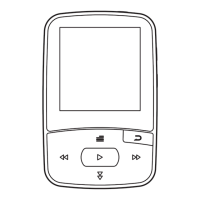
Music play:Choose Music in this MP3 player, short press the 「play/pause」button
to enter into music operation interface → select “All songs”, press 「play/pause」
button to confirm → short press「last one」 or 「next one」 to choose music, press
「play/pause」 button to play
Track browsing:Under music play interface,press 「back」button to find “All
songs”
Fast forward / rewind:Long press「last one 」/「next one」button to rewind/fast
forward.
Tracks switch:Short press「last one」 or 「next one」button to switch
Music play style:Under music play interface, short press 「menu」 enter into setting
→ short press「last one」 or 「next one」to choose “sound settings” → select
“Equalizer” then you can choose different style: Rock, funk, hip hop, jazz, classic,
electronic and custom
Delete current music: Under music play interface, short press 「menu」to enter into
music play setting → short press 「last one」 or 「next one」to select “delete” →
choose “yes” to confirm deletion.
2. Video
Video play:Choose Video in this MP3 player, short press the 「play/pause」button
to enter into video file interface → press「play/pause」button to play after choosing
file
Play/pause:short press the 「play/pause」button to play or pause


 To Next Page