Sub Monitor terminal #1~ #4
Video Normal: 0V DC, When Sub Monitor is on: appx 0.5V DC
Audio Normal: 4.6V DC, When communicating: appx 3.6V DC
Power terminal to FUTURO-4PS3A
To + of FUTURO-4PS3A, 13V DC
To - of FUTURO-4PS3A, GND
2. EOL ( End of Line ) signal termination switch setting on ALL monitors: "1"
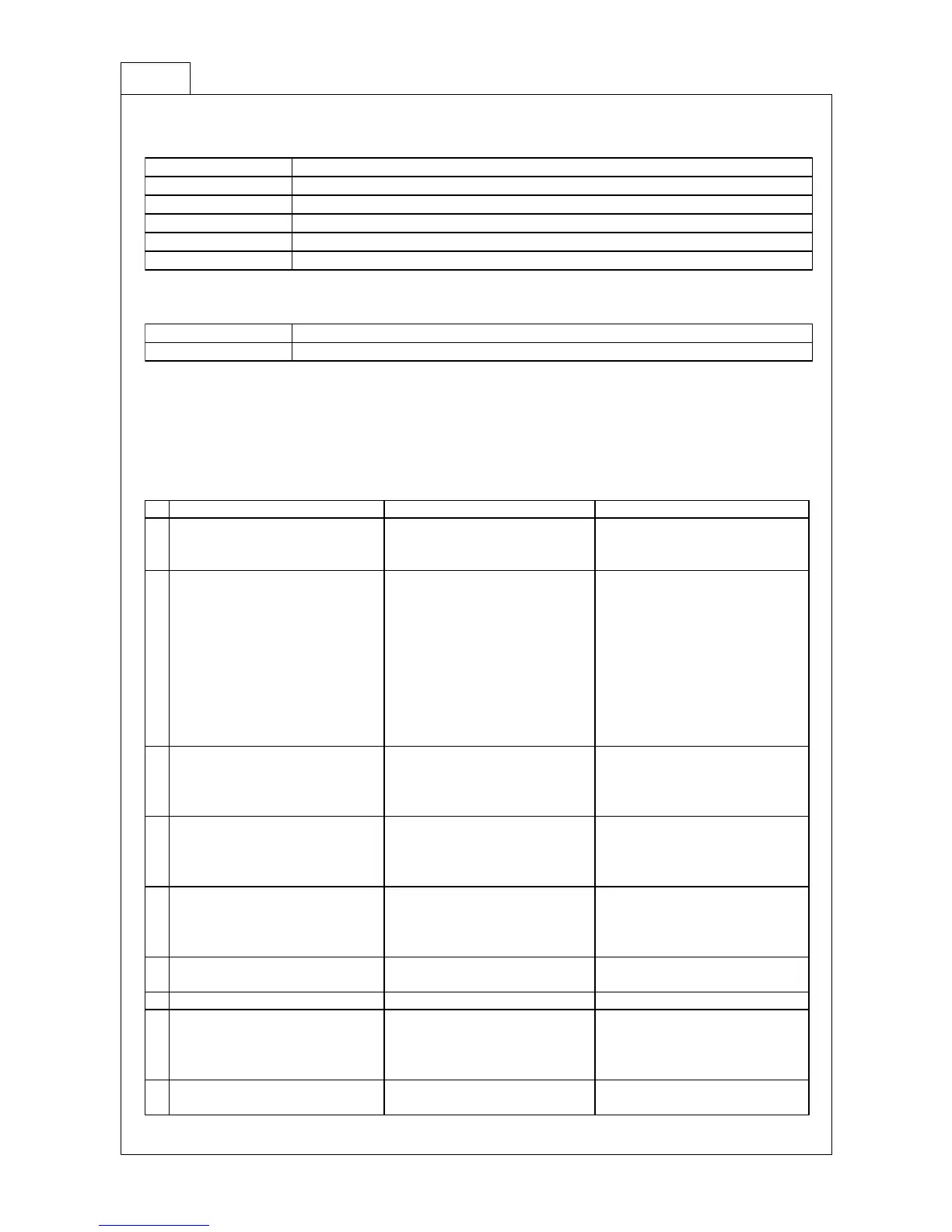
The background image is OK but
a visitor's face appears too dark.
The doorstation is facing a bright
back light.
Please relocate the doorstation
or provide adequate illumination
for visitor's face.
Poor Video or Audio quality.
Distance between the monitor to
camera or sub-monitor is too far.
Electromagnetic interference
through the system.
Wrong EOL switch setting.
Please replace cable with high
performance cable or relocate the
unit to closer location.
Remove the interference source
or relocate the unit or cable.
Ensure appropriate cables are
used and check wires for
continuity or shorts
Correct EOL switch setting.
Pressing the "CALL" button on
the doorstation will not sound a
melody on a monitor(s) but Video
is OK.
Melody Mute is active on the
monitor.
Clear Melody Mute function.
Pressing the "CALL" button will
sound a melody and turn on
screen but no image on the
screen.
V(Video) wire is not connected.
Check continuity and connect V
wire correctly.
Pressing the "CALL" button on
the doorstation will not sound a
melody on monitor(s) and will not
turn on the screen.
A(Audio) wire is not connected.
Check continuity and connect A
wire correctly.
Pressing "DOOR OPEN" won't
open an Electric Door latch.
Cable and power adaptor for the
door latch faulty.
Check continuity of cable and
check power to the door latch.
Will not record any photo
Replace it with FUTURO-SD4.
Will not record even if there is a
motion.
It is FUTURO-SD4B.
No FUTURO-SD-Card has been
inserted.
Replace it with FUTURO-SD4.
Insert a FUTURO-SD-Card.
Incorrect setup of doorstation.
Adjust speaker and microphone
sensitivity at doorstation.


 To Next Page
 Loading...