The Vidonn F1 is a wireless bone conduction sport headphone designed for active users. It offers a range of features for music playback, call management, and ease of use, along with specific instructions for charging, pairing, and maintenance.
Function Description:
The Vidonn F1 serves as a personal audio device, utilizing bone conduction technology to deliver sound, which allows users to remain aware of their surroundings during activities. It supports wireless connectivity via Bluetooth for seamless integration with compatible devices. The headphones are primarily designed for sport use, emphasizing durability and user comfort.
Important Technical Specifications:
While specific technical specifications like frequency response, driver size, or battery capacity are not explicitly detailed, the manual highlights several operational aspects:
- Connectivity: Bluetooth wireless technology.
- Charging: MicroUSB charging cable.
- LED Indicator: Provides visual feedback for various states such as charging (solid red), charging complete (solid blue), power on (flash blue once), power off (flash red once), pairing mode (flash red and blue alternately), pairing complete (flash blue slowly), unpaired (flash red slowly), playing music (breathing blue), incoming call (solid blue), and low battery (flash red slowly).
- Operating Temperature: Recommended range of 0-45°C (32-113°F).
- Water Resistance: The headphones are water resistant but NOT waterproof. They should not be submerged in water.
Usage Features:
The Vidonn F1 incorporates a multifunction button, a volume up/power button, and a volume down button to control various operations:
- Play/Pause Music: Click once.
- Skip to Next Song: Double-click while music is playing.
- Answer/End Call: Click once.
- Reject a Call: Press and hold for 3 seconds.
- Low Power Alert: Automatically triggers a "Battery low" voice prompt when power is less than 30%.
- Restore to Factory Settings: Press and hold both the volume down button and the multifunction button simultaneously. This action is confirmed by "Two beeps."
- Power On/Off: Press and hold for 3 seconds. This action is confirmed by "Power on" or "Power off" voice prompts.
- Turn Up the Volume: Click the volume up button. A single beep indicates when maximum volume is reached.
- Enter into Pairing Mode: Press and hold the volume up button until the LED flashes red and blue alternately. This action is confirmed by a "Pairing" voice prompt.
- Turn Down the Volume: Click the volume down button. A single beep indicates when minimum volume is reached.
Pairing and Connection:
- Charging: Charge the headphones using the MicroUSB cable until the LED indicator turns blue from red.
- Pairing: From an off state, press and hold the power button for 5 seconds to enter pairing mode. The LED indicator will flash blue and red repeatedly.
- Connection: Enable Bluetooth on your device, select "Vidonn F1" from the available devices. A "connected" voice prompt will confirm a successful connection.
Resetting Headphones:
To reset the headphones, enter pairing mode, then press the multifunction button and both volume up button simultaneously for 3 seconds.
Maintenance Features:
Proper maintenance ensures the longevity and optimal performance of the Vidonn F1:
- Storage: Store the headphones in a cool and dry place within the recommended temperature range of 0-45°C (32-113°F). Extreme temperatures or high humidity can reduce battery life.
- Pre-use Charging: If stored for an extended period, charge the headphones before using them again.
- Water Resistance: The headphones are water resistant, but not waterproof. Avoid submerging them in water.
- Hearing Protection: Avoid listening at excessively high volumes, as this can affect hearing and distort audio quality.
- Cleaning: Clean the headphones with a soft and dry cloth.
- Charging Precaution: Do not charge immediately after exercising. Ensure the charging port is dry to prevent sweat from causing circuit damage. Drying the charging port before connecting to a charger reduces this risk.
FCC Warning:
The device complies with FCC rules (Part 15) for Class B digital devices, designed to prevent harmful interference in residential installations. Users are advised to take measures like reorienting antennas, increasing separation from receivers, or consulting professionals if interference occurs. Any unauthorized modifications to the device could void the user's authority to operate it. The device is safe for portable RF exposure conditions.
Shenzhen Vidonn Information Technology Co., Ltd.
Address: 7F China Economy & Trade Building, 18 Zizhu 7 Road, Futian, Shenzhen, 518040 China
Customer service: 400 065 8805
Email: info@vidonn.com
Website: www.vidonn.com

 Need help?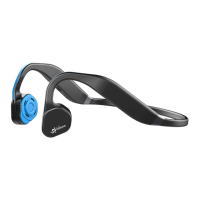

 To Next Page
 General