8
Sekundär
0-10-16 V~
16 V
Primär
230 V~
Gefertigt nach
VDE 0570
EN 61558
Lichttransformator
5200
Nur für trockene Räume
Primär 230 V 50 - 60 Hz
Sekundär max. 3,25 A52 VA
ta 25°CIP 40
10 V
0 V
Universal Tasten - Stellpult
5547
grün
gelb
braun
rot
/ yellow
/ green
brown
/ red
grün
rot
/ green
/ red
z. B./e. g. 5200
5547
Fig. 14
Abb. 14
Fig. 12
Abb. 12
4. Connection and Conguration
4.1 Default settings
The factory setting for the digital address is 1 (DCC for-
mat). Please find further configuration options in the CV
table on page 14.
4.2 Conventional operation (analogue)
In case that you use the Viessmann roller shutter on con-
ventional layouts, use a push-button panel (e. g. push-button
panel item 5547).
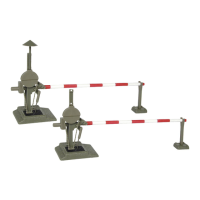
Connect the roller shutter and the push-button panel as
shown in fig. 14. Use a suitable transformer (e. g. item 5200).
4. Anschluss und Einrichtung
4.1 Werkseinstellungen
Ab Werk ist der Decoder auf die Digitaladresse 1 (DCC-
Protokoll) eingestellt. Weitere Konfigurationsmöglichkeiten
entnehmen Sie bitte der CV-Tabelle auf Seite 14.
4.2 Konventioneller (analoger) Betrieb
Im konventionellen (analogen) Betrieb schalten Sie das
Rolltor mit Antrieb mit geeigneten Tastenstellpulten (z. B.
Viessmann Tastenstellpult Art. 5547).
Schließen Sie den Rolltorantrieb und das Tastenstellpult,
wie in Abb. 14 gezeigt, an. Verwenden Sie einen geeigne-
ten Transformator (z. B. Viessmann Art. 5200).
Fig. 13
Abb. 13


 To Next Page