20
DVD Menu OptionsDVD Menu Options
DVD Menu OptionsDVD Menu Options
DVD Menu Options
Caution: The content of this chart is for reference only. If something has changed,Caution: The content of this chart is for reference only. If something has changed,
Caution: The content of this chart is for reference only. If something has changed,Caution: The content of this chart is for reference only. If something has changed,
Caution: The content of this chart is for reference only. If something has changed,
please take the actual display for standard. please take the actual display for standard.
please take the actual display for standard. please take the actual display for standard.
please take the actual display for standard.
Menu function setupMenu function setup
Menu function setupMenu function setup
Menu function setup
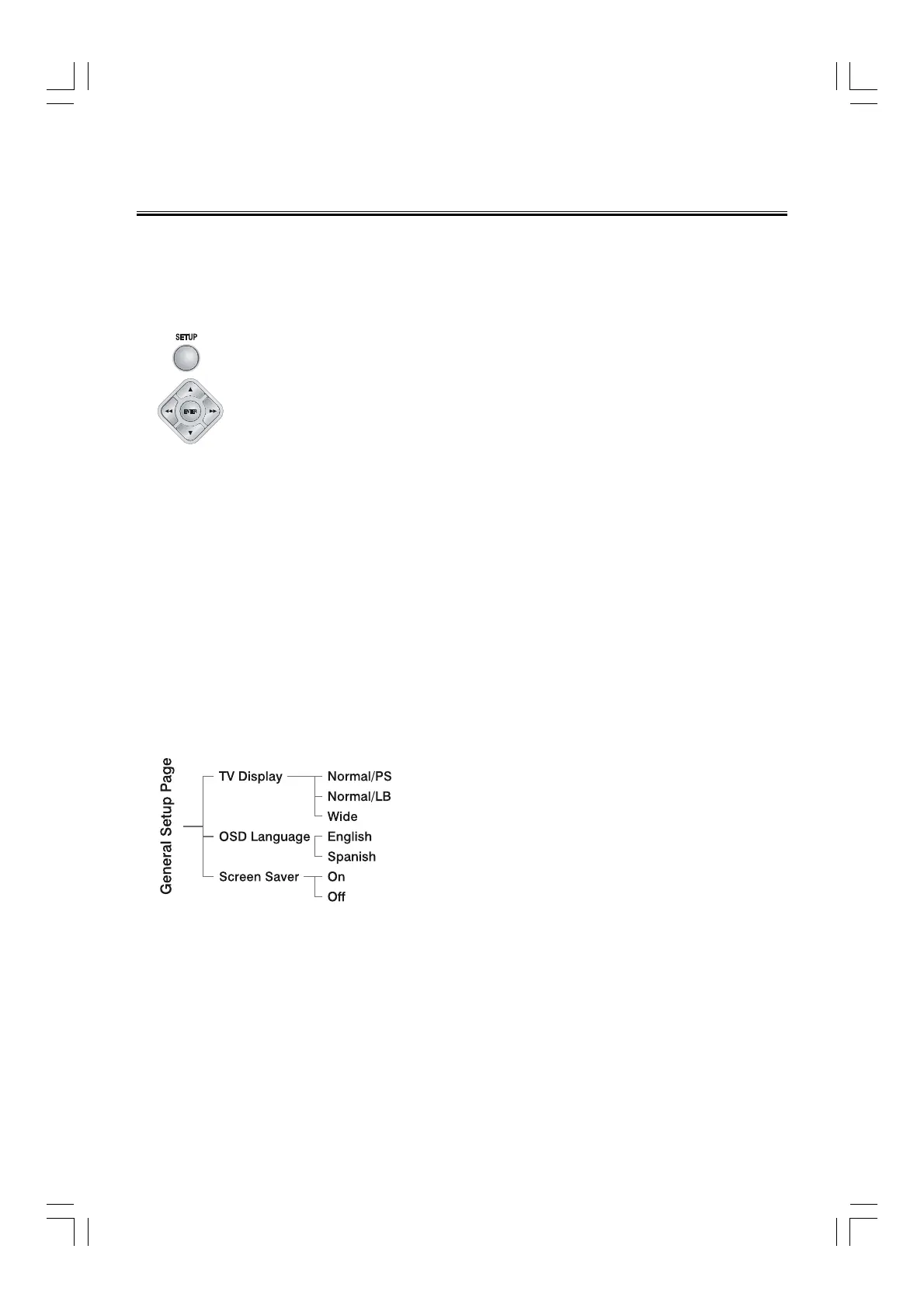
1. Press function setting button (
SETUPSETUP
SETUPSETUP
SETUP
) to enter the Setup Menu.
2. Press
D,C button to select a page to be set.
3. Press
D,C button to highlight an option.
4. Enter its submenu by pressing
C button or
ENTERENTER
ENTERENTER
ENTER
button.
5. Move the cursor by pressing
S,T button to highlight the selected item.
Note: In cases of value setting, press
D,C to adjust values.
6. Press
ENTERENTER
ENTERENTER
ENTER
button to confirm.
Note:Note:
Note:Note:
Note:
Press
D
button to return to the upper-level menu. When in cases of value
setting, please press
ENTERENTER
ENTERENTER
ENTER
button.
Press
SETUPSETUP
SETUPSETUP
SETUP
button to exit from the menu. (The settings will be stored in the
player’s memory even if the player is switched off.)
Note:Note:
Note:Note:
Note:
If the item displays in gray, that means that it can’t be setup or there isn’t this
function in the disc.
General Setup PageGeneral Setup Page
General Setup PageGeneral Setup Page
General Setup Page
TV Display
Normal/PS --- When selecting this mode, wide
picture displayed on the screen will be cut
automatically.
Normal/LB --- When selecting this mode, wide
picture displayed on the screen will have black top
and bottom area.
Wide --- If this system connects wide screen TV,
selecting this mode.
OSD LanguageOSD Language
OSD LanguageOSD Language
OSD Language
This menu allows the user to select the language
for the on-screen display.
Screen SaverScreen Saver
Screen SaverScreen Saver
Screen Saver
Set the screen saver to activate or cancel.


 To Next Page