22
TV ModeTV Mode
TV ModeTV Mode
TV Mode
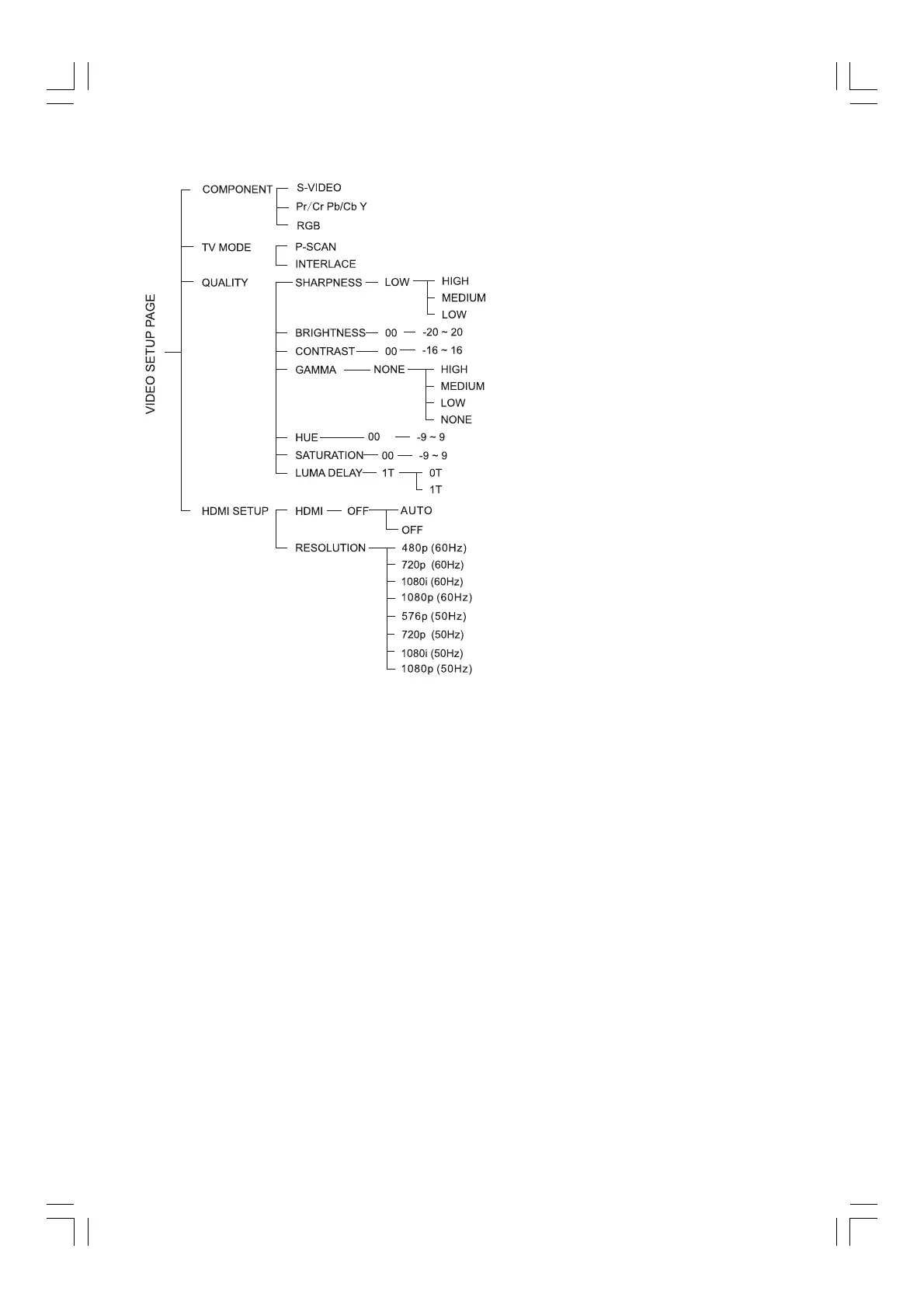
Selects Progressive or interlace
video output mode when Pr/Cr Pb/Cb
Y is selected.
In the progressive scan mode, you
can enjoy the high quality picture with
less flickers. It only works when you
have connected the DVD player's Y
Pb Pr jacks to your TV that supports
the progressive video input.
Otherwise, a distorted picture will
appear on the TV.
QualityQuality
QualityQuality
Quality
This menu helps you to set the video
quality.
SharpnessSharpness
SharpnessSharpness
Sharpness
Adjusts the sharpness level.
High, Medium and Low.
BrightnessBrightness
BrightnessBrightness
Brightness
Adjusts the brightness level.
Range: -20-+20.
ContrastContrast
ContrastContrast
Contrast
Adjusts the contrast level.
Range: -16-+16.
GammaGamma
GammaGamma
Gamma
Adjusts the gamma level.
High, Medium, Low and None.
HueHue
HueHue
Hue
Adjusts the hue level.
Range: -9-+9.
SaturationSaturation
SaturationSaturation
Saturation
Adjusts the saturation level.
Range: -9-+9.
Luma DelayLuma Delay
Luma DelayLuma Delay
Luma Delay
Adjusts the luma delay.
0 T and 1 T.
HDMI SetupHDMI Setup
HDMI SetupHDMI Setup
HDMI Setup
HDMIHDMI
HDMIHDMI
HDMI
HDMI can be set automatically when
your TV is connected to the HDMI
terminal.
Resolution
Resolution
ResolutionResolution
Resolution
You can select the resolution of the
picture according to your preference
and the connected HDMI TV.


 To Next Page