20
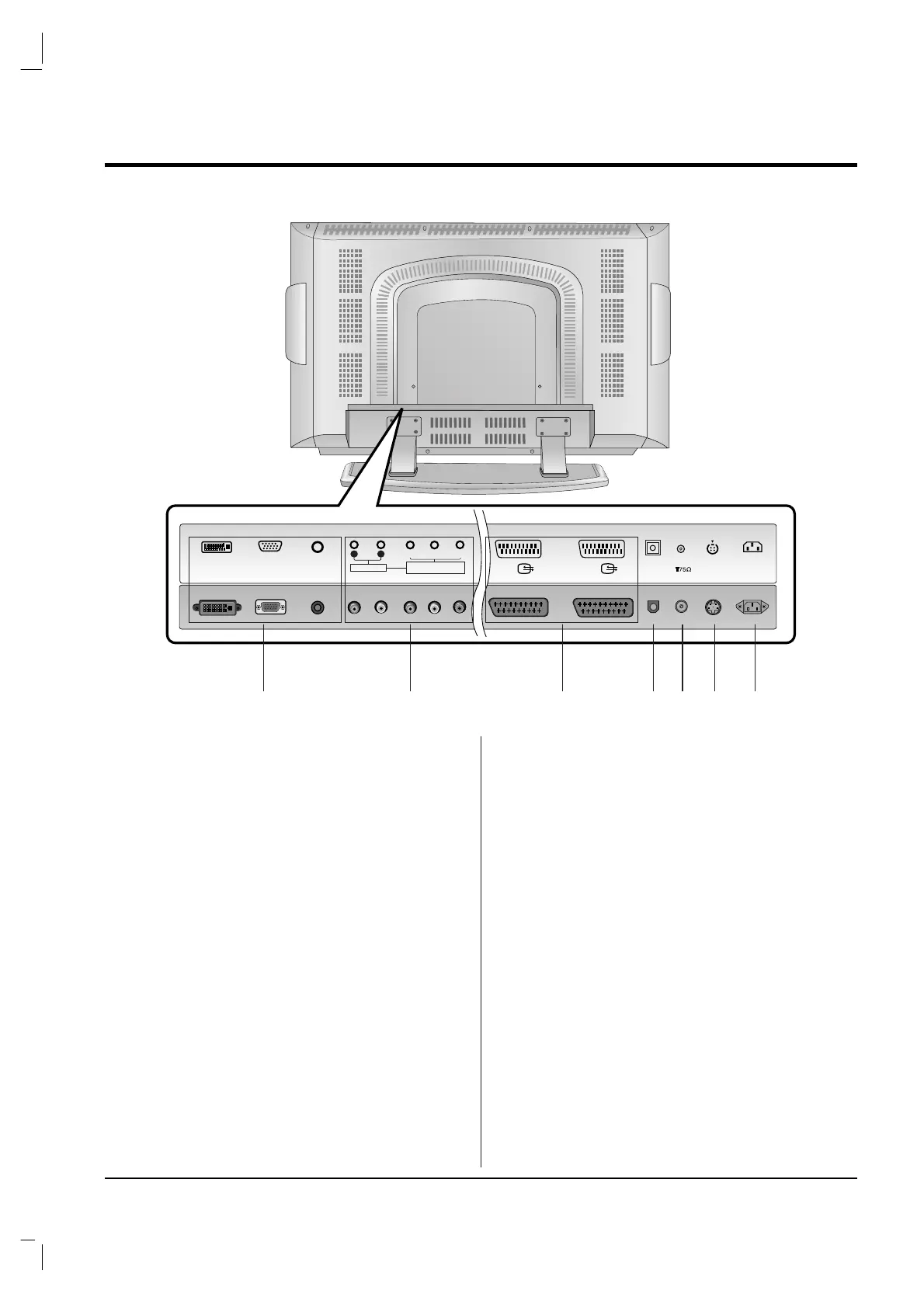
CONNECTIONS OF BACK PANEL
1. DVI INPUT / RGB INPUT / AUDIO INPUT SOCK-
ETS
Connect the set output socket of the PERSONAL
COMPUTER to this socket.
2. AUDIO INPUT / COMPONENT INPUT (480i / 480p
/ 720p / 1080i) SOCKETS
3. EURO SCART SOCKET
connect the euro scart socket of the VCR to these
sockets.
4. Digital Audio (OPTICAL)
Connect digital audio from various types of equip-
ment.
Note : In standby mode, these ports will not work.
5. AERIAL SOCKET
6. S-VIDEO INPUT
connect video out from an S-VIDEO VCR to the S-
VIDEO input.
7. POWER CORD SOCKET
This set operates on an AC power. The voltage is
indicated on the Specifications page. Never attempt
to operate the set on DC power.


 To Next Page