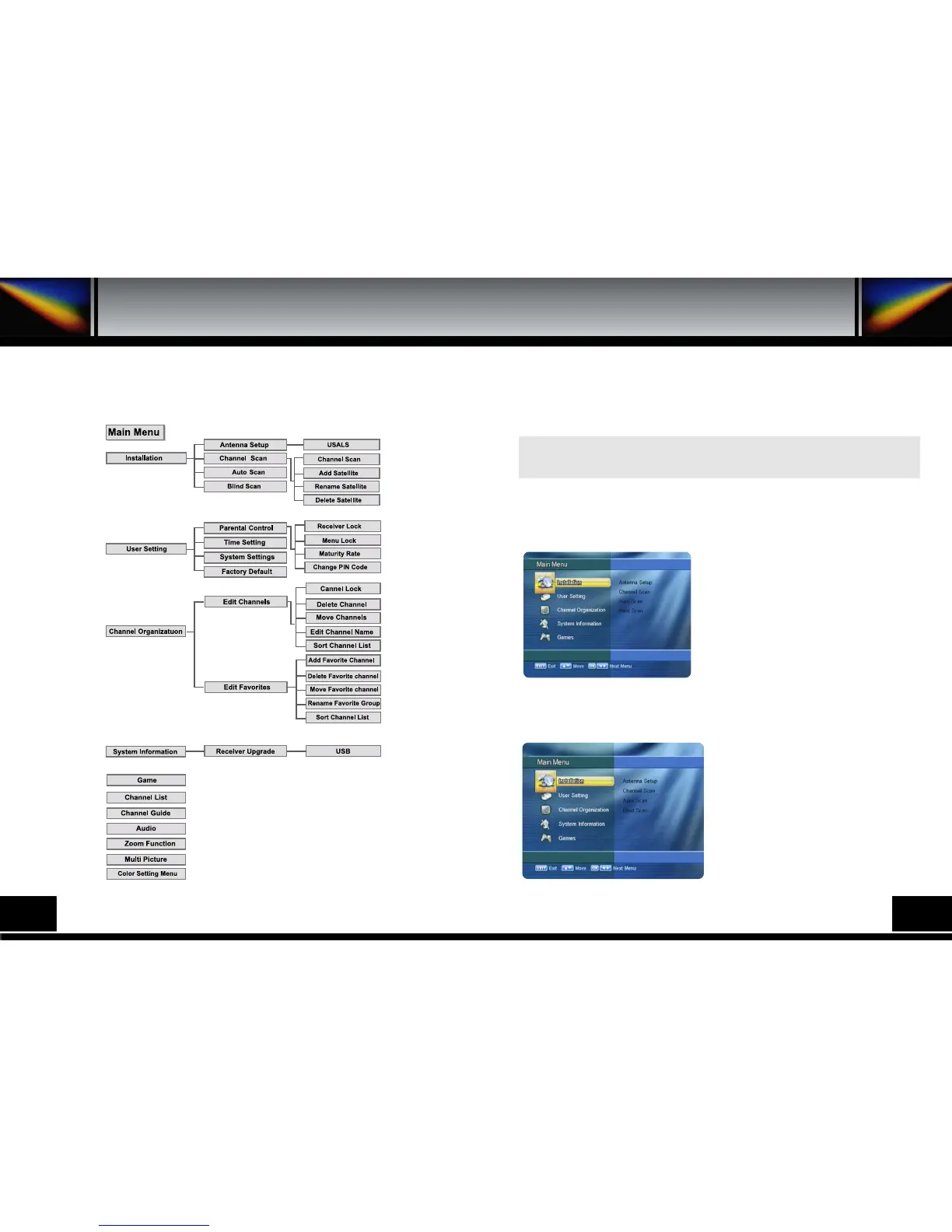
Manu Structure
6. MENU STRUCTURE
14
15
Manu Operation
The main menu is classified into several sub menus which will carry out the
various operation individually.
7. MENU OPERATION
MAIN MENU
After installing your dish system and receiver with appropriate connectors, plug in the AC main
power and turn on the receiver.
Press the MENU key of the RCU. You will see the
Main Menuon the TV screen as follow.
You can move into the desired submenu using the
up/downkeys () or numeric keys.
Press OKkey to confirm your selection. If the Main
Menuis locked, note that you should enter the PIN
code in order to move into the corresponding submenu
in case of Channel OrganizationmenuUser
Settingmenu and Installationmenu.
The default factory PIN code is 0000
Press the menukey or exitkey to return to previous
menu.
1. INSTALLATION
Installationmenu helps you to setup a variety of
parameters necessary for receiving signal, and add
new service.
Select Installationmenu in main menu, and you
will be asked to enter your PIN code.
You can find the following Installationscreen by
entering it.


 To Next Page