EasyManua.ls Logo

ViewSonic CD4233 - Page 9

ViewSonic CD4233
16 pages
Print Icon
To Next Page IconTo Next Page
To Previous Page IconTo Previous Page
Loading...
Commercial Display RS-232 Protocol
Revision 1.x
________________________________________________________________
May 28, 2007 9 / 16 Commercial Display RS-232 Protocol
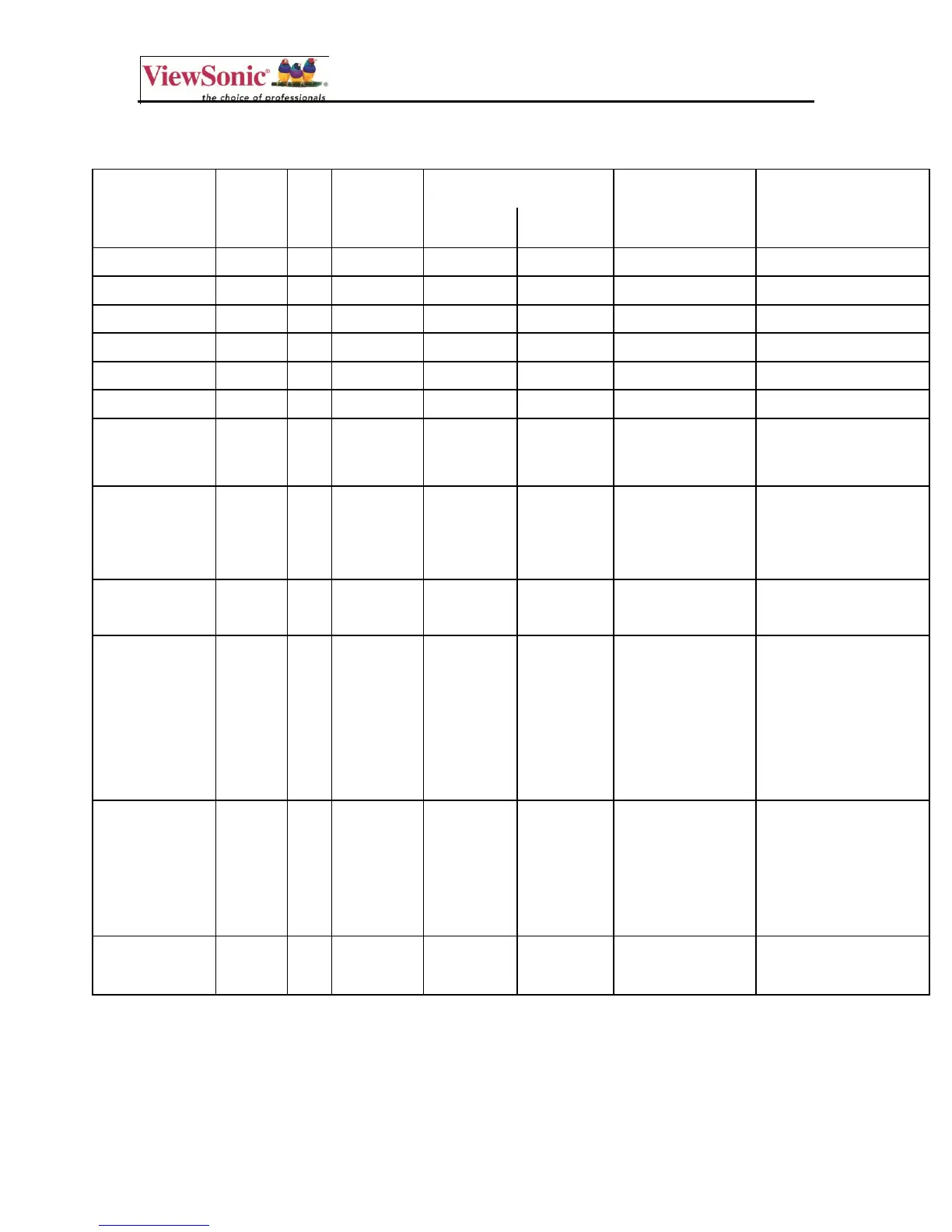
PC Get-function command to CD5233/CD4233 LCD Monitor
Get Function
Length
ID
Command
Type
Command
Response
Range
Comments
Code
(ASCII)
Code
(Hex)
(Three ASCII
bytes)
Get-Contrast
8
g
a
61
000 ~ 100
Gets Contrast value
Get-Brightness
8
g
b
62
000 ~ 100
Gets Brightness value
Get-Sharpness
8
g
c
63
000 ~ 100
Gets Sharpness value
Get-Color
8
g
d
64
000 ~ 100
Gets Color value
Get-Tint
8
g
e
65
000 ~ 100
Gets Tint value
Get-Volume
8
g
f
66
000 ~ 100
Gets Volume value
Get-Mute
8
g
g
67
000: OFF
(unmuted)
Gets Mute ON/OFF
status
001: ON (muted)
Get-RCU
8
g
h
68
000: Disable
Gets RCU mode
status
001: Enable
002: Pass
through
Get-Key Pad
8
g
i
69
000: Disable
Gets Buttons ON/OFF
status
001: Enable
Get-Input
select
8
g
j
6A
000: VGA
Gets Input select
status
001: HDMI
002: DVI-D
003: AV
004: YPbPr
005: S-Video
Get-Power
status
8
g
l
6C
000: STBY
Gets the status of the
HDTV power.
001: ON
HDTV response:
000 = HDTV is in
standby
001 = HDTV is ON
Get-ACK
8
g
z
7A
0
This command is
used to test the
communication link.

Other manuals for ViewSonic CD4233

Related product manuals