6
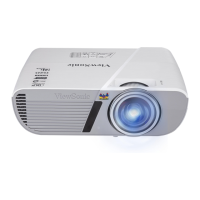
Projector exterior view
1. External control panel
(See "Projector" on page 7 for
details.)
2. Lamp cover
3. Vent (heated air exhaust)
4. Front IR remote sensor
5. Adjuster foot
6. Focus and Zoom rings
7. Projection lens
8. RS-232 control port
9. Type A USB port (for 5V power)
10. Type B USB port
11. HDMI 1 port
12. HDMI 2 port
13. RGB (PC)/Component video
(YPbPr/YCbCr) signal input socket
14. RGB signal output socket
15. S-Video input socket
16. Video input socket
17. Audio signal input socket
Audio signal output socket
18. Kensington anti-theft lock slot
19. AC power cord inlet
Warning
• THIS APPARATUS MUST BE EARTHED.
• When installing the unit, incorporate a readily accessible disconnect device in the fixed wiring,
or connect the power plug to an easily accessible socket-outlet near the unit. If a fault should
occur during operation of the unit, operate the disconnect device to switch the power supply
off, or disconnect the power plug.
18
8 9
10
11 12
1514 16 1713
19



 To Next Page