EasyManua.ls Logo

ViewSonic TeamJoin TRS10 - Connecting to the Touch Console; Cable Management

ViewSonic TeamJoin TRS10
46 pages
Print Icon
To Next Page IconTo Next Page
To Previous Page IconTo Previous Page
Loading...
12
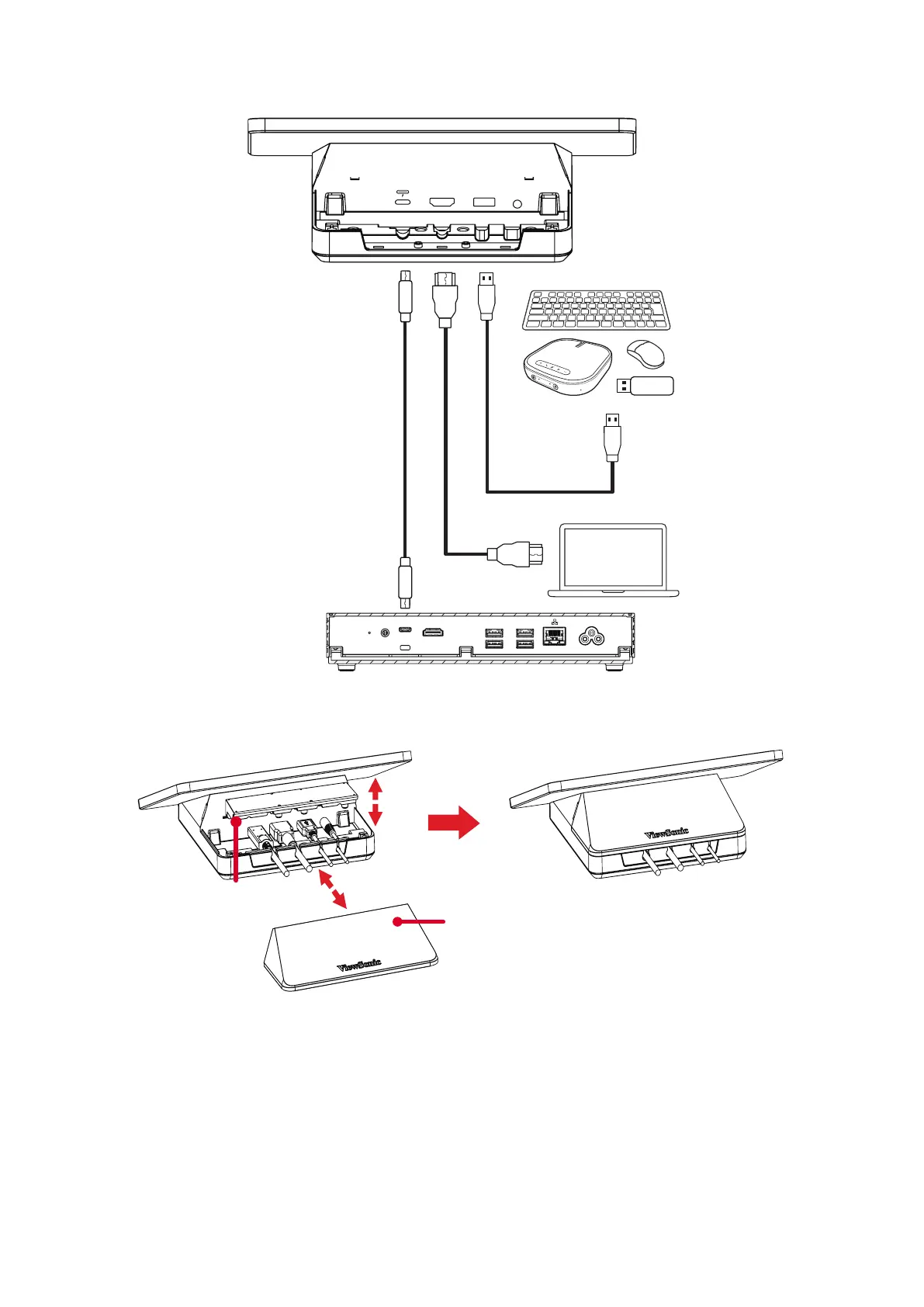
Connecng to the Touch Console
HDMI OUT
USB 3.0USB 3.0
PERIPHERAL
AC POWER
FOR DISPLAY
FOR CONSOLE
MPC310-W31-TU
USB Type C USB Type A
HDMI
AUDIO OUTUSB 2.0HDMI IN
Cable Management
Slide cover
Cable fixing bracket
HDMI OUT
USB 3.0USB 3.0
PERIPHERAL
AC POWER
FOR DISPLAY
FOR CONSOLE
MPC310-W31-TU
USB Type C USB Type A
HDMI
AUDIO OUTUSB 2.0HDMI IN
1. Remove the slide cover and of the Touch Console and cable xing bracket.
2. Connect any necessary cables to the I/O ports of the Touch Console and direct
the cables through the cable channels.
3. Replace the cable xing bracket and slide cover of the Touch Console.