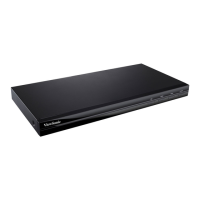
This document is a Quick Start Guide for the ViewSonic VPC15-WP Slot-in PC module, designed for the IFP50 series. The model number of the device is VS17059.
Function Description:
The ViewSonic VPC15-WP is a slot-in PC module that integrates computing capabilities directly into compatible ViewSonic IFP50 series interactive flat panel displays. It transforms the display into an all-in-one interactive solution, providing a full Windows PC experience without the need for an external computer. This module is designed to enhance the functionality of the IFP50 series, enabling users to run various applications, access the internet, and connect peripherals directly through the display. It serves as the central processing unit for interactive whiteboarding, presentations, and collaborative tasks in educational and corporate environments.
Important Technical Specifications:
IO Ports:
The module is equipped with a comprehensive set of input/output ports to support a wide range of connectivity options:
- 1 x Display Port: For high-definition video output.
- 1 x HDMI: For high-definition multimedia interface, supporting both video and audio.
- 1 x VGA: For analog video output.
- 1 x LAN (RJ45): A standard RJ45 (10M/100M/1G) Internet connection interface, specifically for PC use.
- 2 x USB 2.0 (5V/0.5A): For connecting various USB 2.0 compatible peripherals.
- 4 x USB 3.0 (5V/0.9A): For faster data transfer with USB 3.0 compatible devices.
- 1 x USB Type C: A versatile port for data, video, and power.
- 1 x Earphone: For connecting headphones or external speakers.
- 1 x Microphone: For connecting a microphone.
Power:
- Input Voltage: 100V-240V AC
- Frequency: 50/60Hz
- Power Consumption: 95W
Operating Conditions:
- Temperature: 32°F to 113°F (0°C to 45°C)
- Humidity: 10% ~ 90% non-condensing (non-condensing)
- Altitude: 0 meter to +5000 meters above sea level
Storage Conditions:
- Temperature: -4°F to 140°F (-20°C to 60°C)
- Humidity: 10% ~ 90% non-condensing (non-condensing)
- Altitude: 0 meter to +5000 meters above sea level
Physical Dimensions:
- Dimensions (Physical): 246.1 x 263.4 x 32.2 mm
- Weight (Physical): 1.95 kg
Wireless Connectivity (Frequency Range and Output Power Max.):
- Bluetooth (BT): 2402 to 2480 MHz, 2.0 dBm
- Bluetooth Low Energy (LE): 2402 to 2480 MHz, 3.73 dBm
- Wi-Fi (2.4 GHz): 2412 to 2472 MHz, 17.41 dBm
- Wi-Fi (5 GHz - Band 1): 5150 to 5250 MHz, 18.94 dBm
- Wi-Fi (5 GHz - Band 2): 5250 to 5350 MHz, 18.94 dBm
- Wi-Fi (5 GHz - Band 3): 5470 to 5725 MHz, 18.94 dBm
Usage Features:
Installation:
The installation process involves physically inserting the PC module into the designated slot on the IFP50 series display. The guide illustrates a three-step process:
- Step 2-1: Shows the module being aligned and slid into the slot from the side of the display.
- Step 2-2: Depicts the module fully inserted and secured, likely with a locking mechanism or screws (though not explicitly detailed, the arrows suggest a firm push to secure).
- Step 2-3: Confirms the module is fully integrated into the display.
Internet Connection:
The module supports both wired and wireless internet connections.
- Wired: Connect a standard RJ45 Ethernet cable from a router or network switch to the LAN port on the PC module.
- Wireless: The module has a WIFI antenna interface, indicating support for Wi-Fi connectivity. The diagram shows a wireless router connected to the module, implying that the module can connect to a Wi-Fi network.
USB Connection:
The module offers multiple USB ports (2 x USB 2.0, 4 x USB 3.0, 1 x USB Type C) for connecting various peripherals such as:
- Mouse
- Keyboard
- Webcam
- USB flash drives
- Other USB-compatible devices
After installation, users can select the PC module as the input source on the IFP50 series display. This is done via the display's on-screen menu:
- Press the "INPUT" button on the remote control to open the input setting menu.
- Navigate down to enter the input source menu.
- Use the directional buttons (DOWN/UP/LEFT/RIGHT) to select "PC".
- Press the "Enter" button on the remote control or use a touch pen to select "PC" as the input source.
- Press the "EXIT" key on the remote control or tap a blank area outside the menu with a touch pen to close the on-screen menu.
Maintenance Features:
The device adheres to several regulatory standards:
- FCC Compliance Statement: Complies with part 15 of FCC Rules, ensuring it does not cause harmful interference and accepts received interference. It is a Class B digital device. Users are advised on measures to correct interference, such as reorienting antennas or increasing separation from other equipment.
- Industry Canada Statement: Complies with CAN ICES-3 (B)/NMB-3(B) and includes FCC ID: PD93165NG and IC ID: 1000M-3165NG.
- CE Conformity for European Countries: Complies with EMC Directive 2014/30/EU, Low Voltage Directive 2014/35/EU, and Radio Equipment Directive (RED) 2014/53/EU.
- WEEE Directive 2012/19/EU: Indicates that the product should not be disposed of as unsorted municipal waste but through proper return and collection systems.
- Indoor Use Restriction (EU): Operation of 5150-5350MHz is restricted to indoor use only in EU member states. A minimum distance of 20cm between the radiator and the user's body is recommended.
- Indian Restriction of Hazardous Substances (RoHS): Complies with the "India E-waste Rule 2011," prohibiting the use of lead, mercury, hexavalent chromium, polybrominated biphenyls, or polybrominated diphenyl ethers above specified concentrations, with certain exemptions listed in Schedule 2 of the Rule.
- Declaration of RoHS2 Compliance: This product is designed and manufactured in compliance with Directive 2011/65/EU, restricting hazardous substances in electrical and electronic equipment. It provides a table showing the proposed maximum concentration and actual concentration of substances like Lead (Pb), Mercury (Hg), Cadmium (Cd), Hexavalent Chromium (Cr6+), Polybrominated biphenyls (PBB), and Polybrominated diphenyl ethers (PBDE), all of which are below the specified limits. It also lists exemptions for certain components.
Customer Support:
The manual provides a comprehensive list of contact information for technical support and product service across various countries/regions, including Australia, New Zealand, Canada, Europe, Hong Kong, India, Korea, Latin America, Macau, Middle East, Puerto Rico & Virgin Islands, Singapore/Malaysia/Thailand, South Africa, and United States. This includes website addresses, telephone numbers, and email addresses. Users are advised to have the product serial number ready when contacting support.
Overall, the ViewSonic VPC15-WP Slot-in PC module is a robust and compliant solution designed to seamlessly integrate PC functionality into ViewSonic IFP50 series displays, offering extensive connectivity and adherence to global environmental and safety standards.

 Need help?
 General

 To Next Page