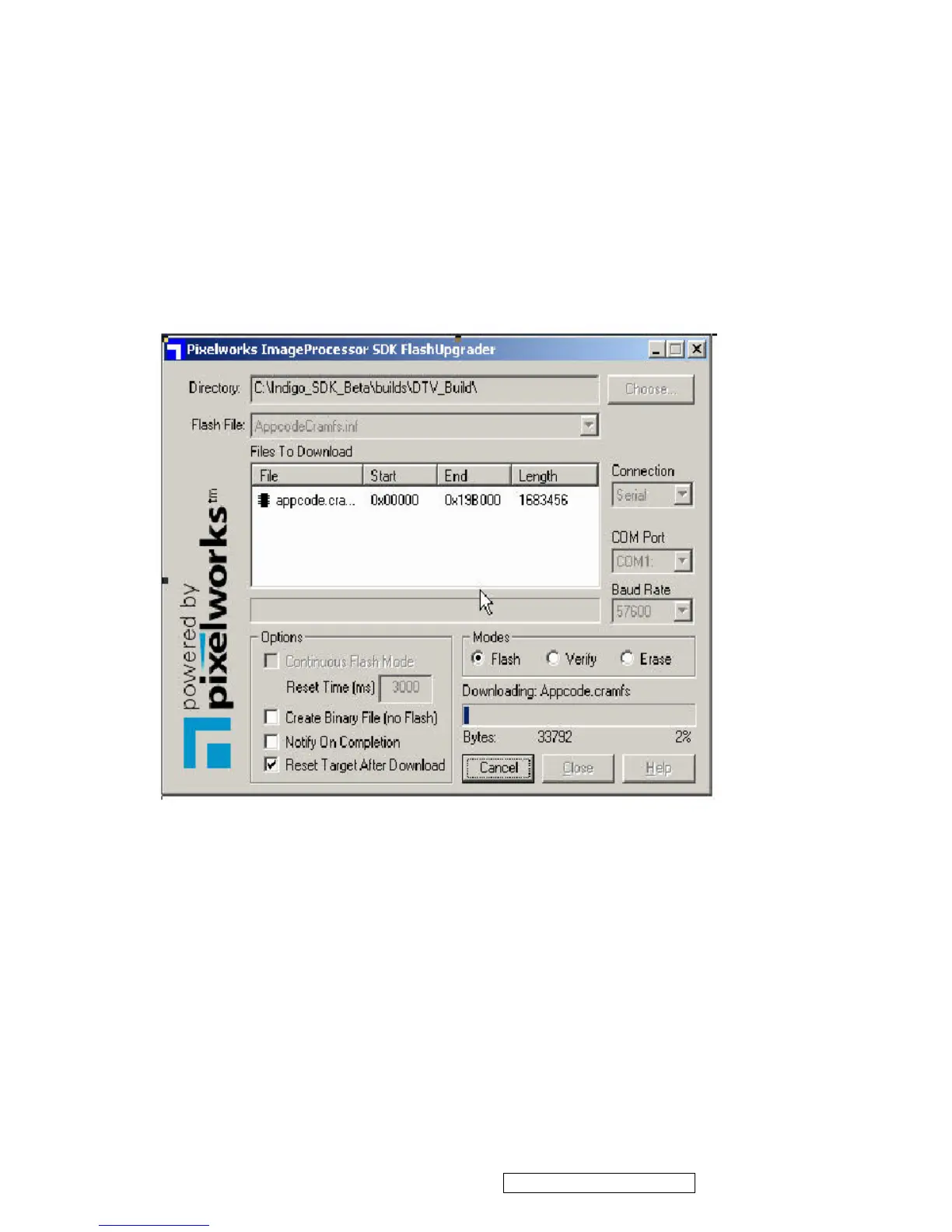
(3) Connecting method: connecting RS232 interfaces between PC and TV set.
Firmware writing procedure:
1. Execute Pixelworks Flash Upgrader software
2. Select Baud Rate by 57600
3. Download “appcode.crams” file.
4. Choose “Flash” mode entering standby status for writing firmware
5. Turn on TV set.
6. "Bytes Bar" will showed on the screen in few seconds indicating firmware was downloading.
7. The download process will take about 4 Minutes. It won’t change the original code when download
process intercepted. Once download process was finished system have to take at least 30 seconds
updating new firmware. Please make sure power was supplied without interruption; otherwise system will
shut down.
8. System will restart automatically after finishing writing process.
ViewSonic Corporation Confidential - Do Not Copy N3260w_N3760w
N4060w
21






 To Next Page