11
Removing the Stand and Mounng the Monitor
NOTE: Only use UL Cered wall mount kits.
HDMI 1 HDMI 2
MINI
DP
DP
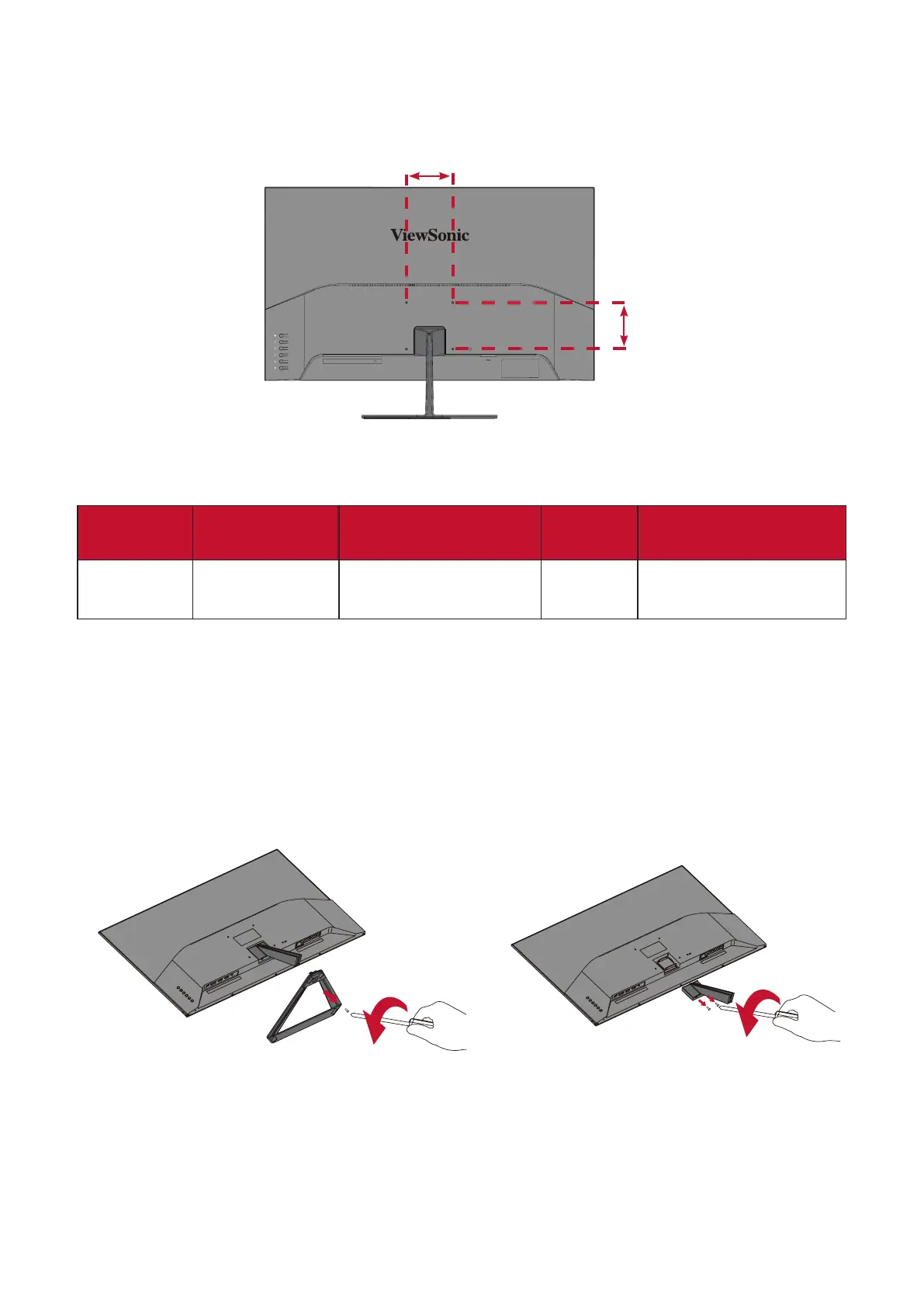
100 mm
Refer to the table below for the standard dimensions for wall mount kits.
Maximum
Loading
Hole paern
(W x H)
Interface Pad
(W x H x D)
Pad Hole
Screw Specicaon
& Quanty
14 kg 100 x 100 mm 115 x 115 x 2.6 mm Ø 5 mm
M4 x 12 mm
4 pieces
NOTE: Wall mount kits are sold separately. To obtain a wall mounng kit,
contact ViewSonic® or your local dealer.
1. Turn o the device and disconnect all cables.
2. Place the device on a at, stable surface with the screen facing down.
3. Remove the monitor stand.
1 2
100 mm




 To Next Page