4
1. Connect a Cable line to WAN1 port and a DSL modem to WAN2 port respectively.
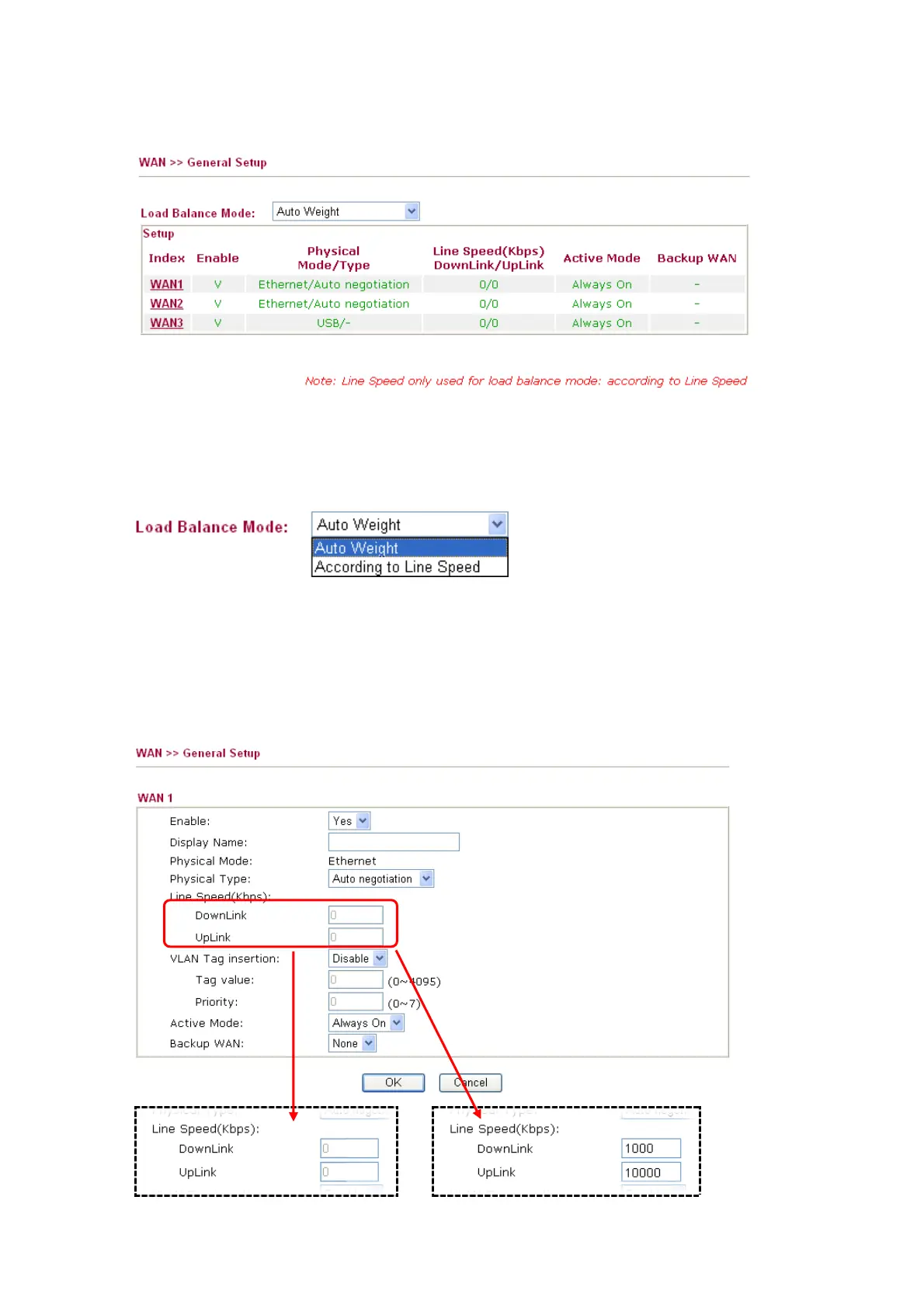
2. Open the Web configurator and go to WAN >> General Setup.
3. Configure Load Balance Mode. If you know the real speed of both lines (WAN1 / WAN2),
please select According to Line Speed. If you have no idea about the line speed, please just
select Auto Weight. Vigor router will automatically detect the maximum available
bandwidth.
Note: By monitoring real time speed of both WAN connections, the Dual-WAN Gateway
will establish new sessions based on the ratio of the amount of the remaining available
bandwidth.
4. Click the WAN1 link. Choose Always On for Active Mode. If you know the real speed of
both lines, please enter the speed value (you have to select According to Line Speed as
Load Balance Mode first). Click OK to save it and exit the page.
or


 To Next Page