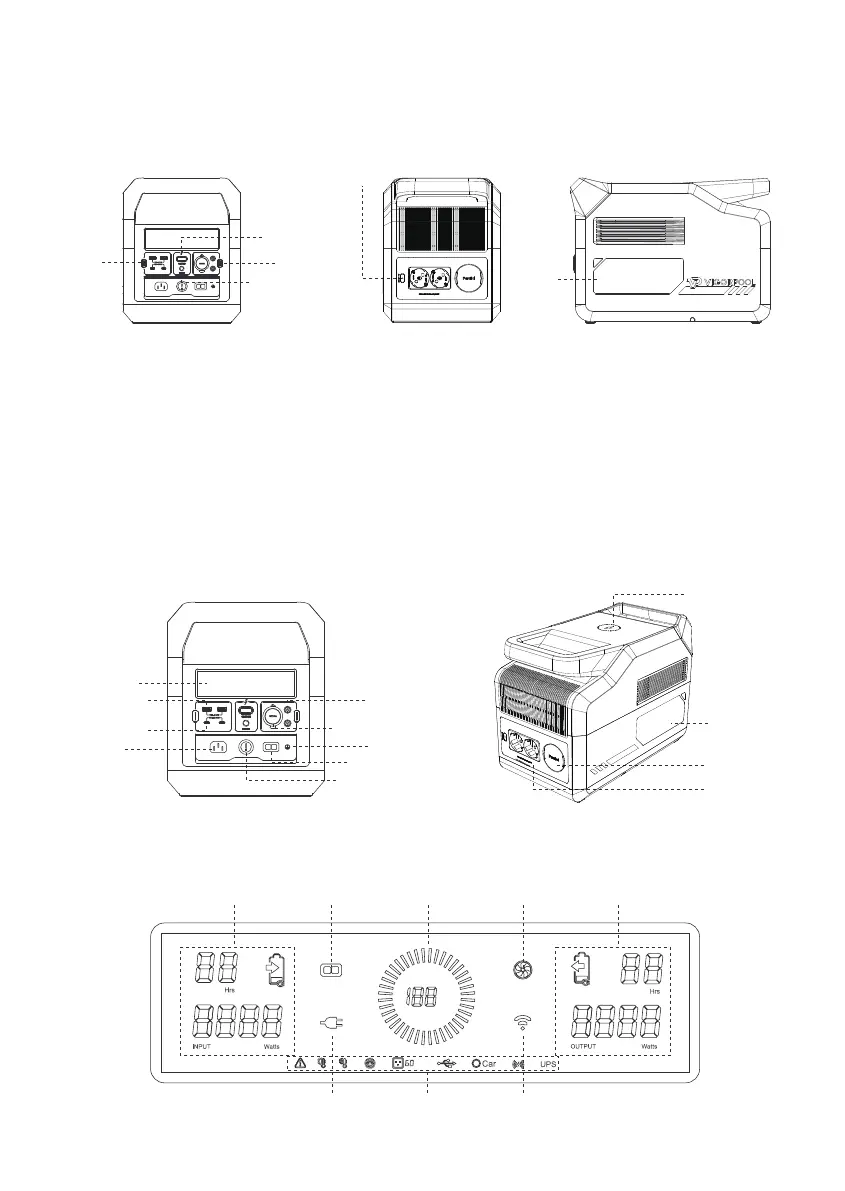
3. Start Guides for Users
3.1 Using Captain 1200
1. Long press the power button, the LCD screen & product on; short press the power button, the LCD screen & product off.
2. If your phone fails to connect with the device, please long press the IoT reset button.
3. With the power button turned on, short press the USB button/ DC button/ AC button to use those ports; short press again to turn
them off.
4. With the power button turned on, short press the light button to get four modes: weak light, strong light, SOS, flashing.
Please note: For power saving, the VIGORPOOL CAPTAIN 1200 AC output will be turned off automatically after 12 hours if power
usage remains under 20W. DC & USB output will be turned off automatically after 12 hours if power usage remains under 5W.
3.2 Details of Captain 1200
AC Input
AC Output
Parallel Port
Light
Wireless Output
LCD Screen
DC5521 Output
Car Charge Port Output
Anderson Port Input
Overcurrent Protection
USB-A Output
USB-C Output
Protective Earth
Power Switch
DC Button
IoT Reset Button
USB
Button
Light
Button
AC Button
3.3 LCD Screen
Input area Anderson Port
AC Input
Power Display
Wi-Fi
Fan Ouput area
Min
Min
Hz
%
Ports Usage status
3



 To Next Page