6 100663-00 100663-00 7
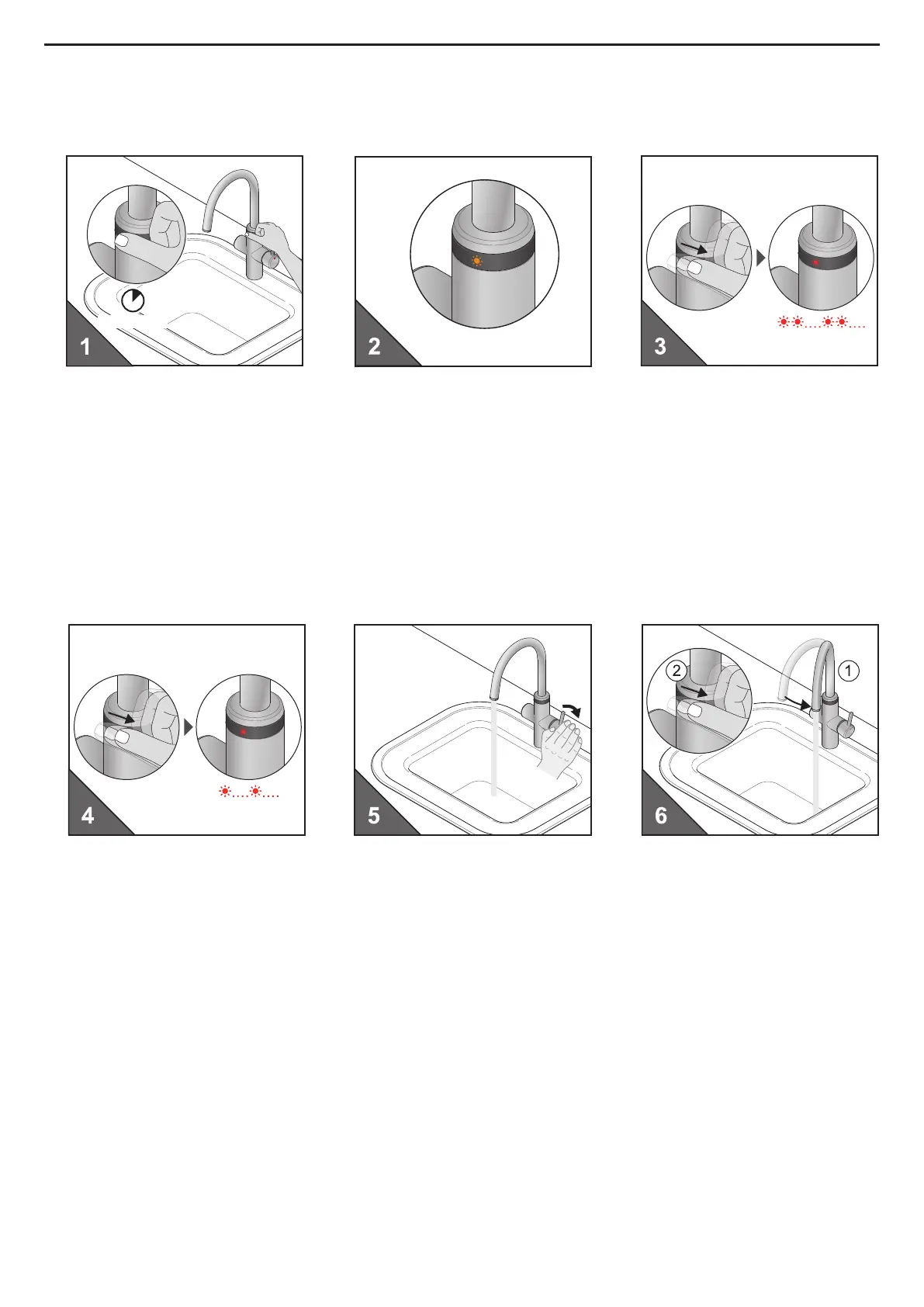
• Einstellung Schwenkbereich Sensor/Elektronik
• Adjusting swivel range for sensor functions
min. 2 sec.
˟
2
˟
2
• 1xTouch für min. 2 Sek. drücken
• Press Touch once for min. 2 sec.
• 2xTouch drücken
• LED Anzeige blinkt pulsierend rot
• Press touch twice
• LED display ashes pulsating red
• LED Anzeige blinkt einmal orange
• LED display ashes orange once
• 2xTouch drücken
• LED Anzeige blinkt rot in Sekundentakt
• Press touch twice
• LED display ashes red every second
• Auslauf gegen den Uhrzeigersinn
drehen bis Spülenrand
• 1xTouch drücken
• Turn the spout anticlockwise to
the edge of the sink
• Press touch once
• Hebel betätigen, um Wasser laufen
zu lassen
• Press the lever to let the water run



 To Next Page