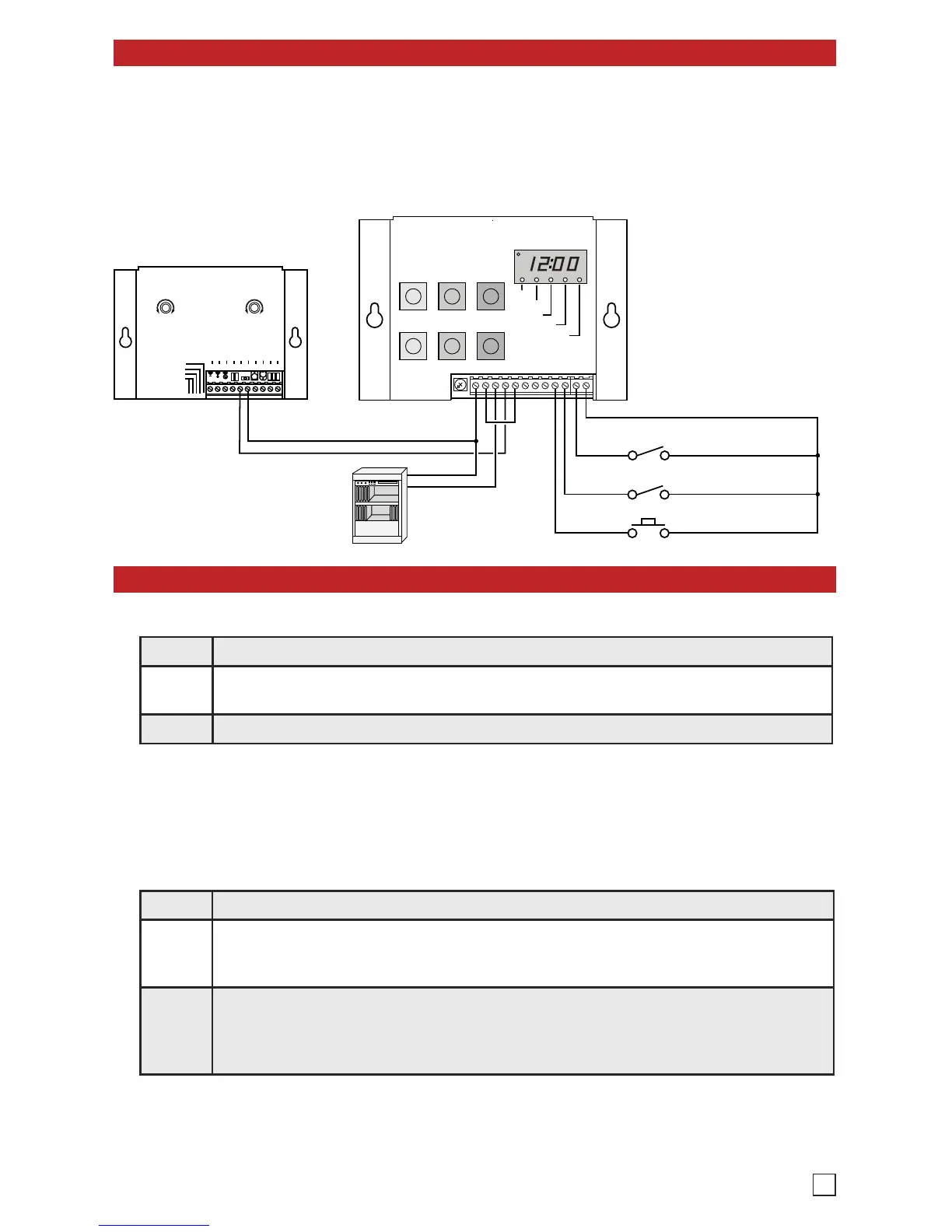
Connect the CTG-1 between your phone system and your paging amplifier as shown in the diagram
below. The factory installed rechargeable 9V battery will maintain the clock time for over 8 hours.
IMPORTANT: The CTG-1 leaves the factory with the battery backup DIP switch turned OFF to
avoid discharging the battery during shipment. The battery backup DIP switch MUST be set to
ON (see Programming section J) to maintain clock time during a power outage.
Programming
A. Setting the Clock Time
B. Setting the Day of the Week
Step 1. Press the MODE button repeatedly until the SET TIME indicator lights.
Step 2.
Increase or decrease the clock time by pressing the + or -/CANCEL button until the
desired time is displayed.
Step 3. Leave the set time mode by pressing the MODE button.
Note: Either the + or -/CANCEL button MUST be pressed at least once prior to leaving the set
time mode. The clock will then start to run the moment you leave the set time mode, allowing you
to synchronize the CTG-1 with your building clocks.
Note: This step is only required if you want to turn off the Alert Tones on certain days of the week.
Step 1. Press the MODE button repeatedly until the SET DAY indicator lights.
Step 2.
A flashing “A” indicates all 7 days of the week are “on” and today’s day has not been
set. The day of the week has already been set if a flashing number (1-7) and “on” or
“of” are displayed.
Step 3.
Select today’s day of the week using the TIME (+ and -/CANCEL) buttons. As a general
rule, Sunday is day 1 and Saturday is day 7. When today’s day of the week is flashing
on the display, set it by pressing the DOUBLE alert tone button. Today’s day number
and “on” will now be displayed.
Note: The day of the week setting and turning the alert tones off on specific days of the week is a one time set
up and does not need to be reset unless you have experienced a brown out long enough to discharge the 9V
battery backup (approximately 8 hours). To reset the day of the week and turn off tones on specific days of the
week, you must power down the CTG-1, set DIP switch 1 to OFF, power up the CTG-1 and repeat steps 1-3
above. If you had alert tones turned off on specific days of the week, repeat steps 1-4 in section C. When finished,
set DIP switch 1 back to ON.
3


 To Next Page
 Loading...