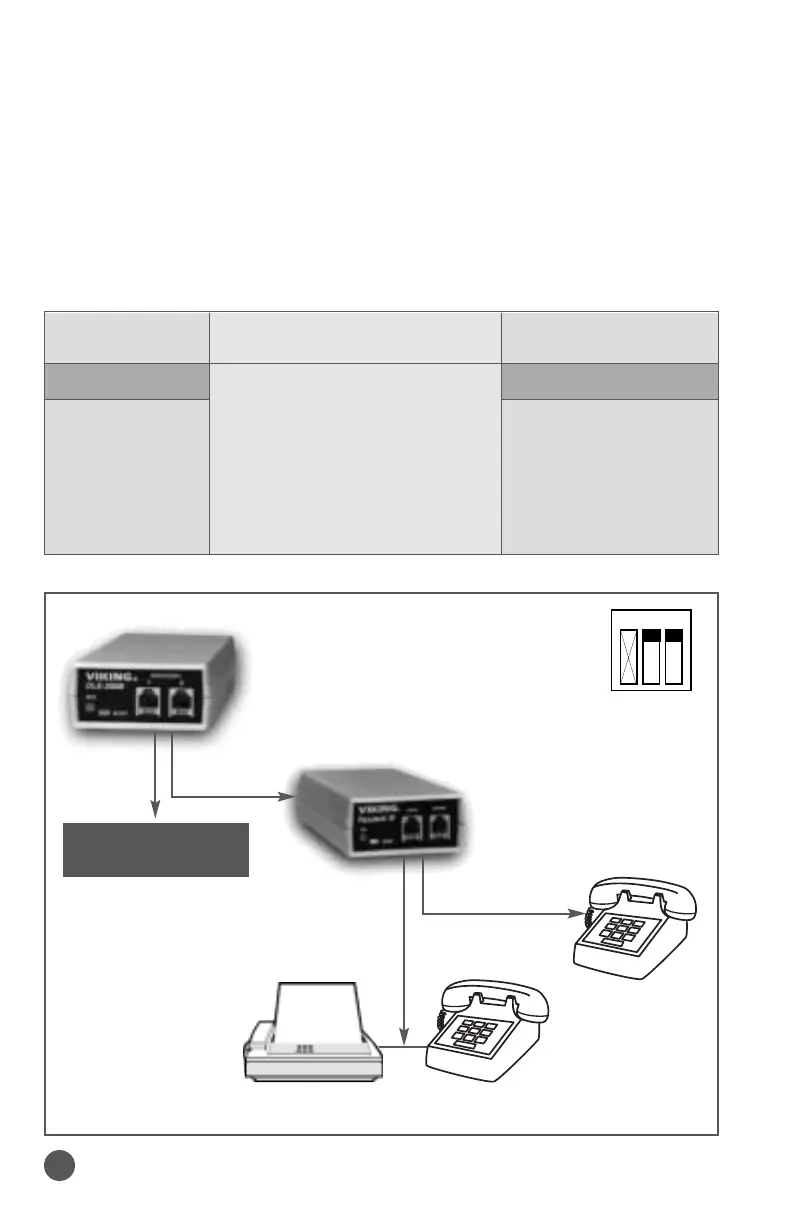
The DLE-200B can generate 4 different distinctive ringing patterns.
The FAXJ-300 or PDF-2 must be set to the custom ring detection
mode by setting the proper switches (see the appropriate Tech Practices).
The following chart shows the ringing patterns generated for each switch
setting on the DLE-200B and the port the call will be directed to on the
FAXJ-300 or PDF-2.
Switch Settings Ring Pattern Generated Port the Call will
on the DLE-200B by the DLE-200B be directed to By:
SW-1 SW-2 FAXJ-300 PDF-2
OFF OFF 2 SECOND “ON” PHONE PHONE
4 SECOND “OFF” (NORMAL)
ON OFF SHORT, LONG, SHORT NONE MODEM
OFF ON SHORT, SHORT, LONG NONE MODEM
ON ON LONG, LONG DATA FAX
Demonstrate Custom Ringing
Demonstrate the FAXJ-300 and PDF-2 Custom Ringing Detection
8
Fax Machine Single Line
Telephone
Single Line
Telephone
X-N.A.
(switches
are on the
bottom)
Single Line
Device
Set switches 2 and 3 to
the “ON” position.
Press the “TR” button
on the FAXJ-300.
ON



 To Next Page