Operation
If the RC-2A is programmed to answer a ringing line (DIP switch 7 ON), it will answer after the selected ring delay.
A single acknowledgement tone will be heard, signaling the user that the RC-2A has answered the line. If a se-
curity access code has been programmed (no code switches set to D), a touch-tone "Q" plus the security access
code may be entered at this time and a second acknowledgement tone will be heard. After this acknowledgement
tone, the built in 2 digit relay commands can be dialed (see page 5, C. Relay Activation Codes). If "Q" plus an
incorrect security access code is entered, the RC-2A will immediately disconnect (hang-up). To prevent unau-
thorized use, if a user dials "Q" plus an incorrect security access code on 5 consecutive incoming calls, the unit
will disconnect and not answer the line for 60 minutes.
If the RC-2A is not programmed to answer the line (DIP switch 7 OFF), it can passively monitor a communication
path for the proper access and/or activation code.
The RC-2A provides a relay activation (opening or closing a relay contact) remotely via DTMF Touch Tone input
over a standard analog C.O. line or PABX/KSU station. When the correct relay activation code is entered, the
RC-2A activates its relay contacts on the terminal strip followed by an acknowledgement tone.
A. Legacy Mode
6
N.O.
N.C.
Switch 1 Switch 2 Switch 3 Switch 4
Relay Activation
Time
OFF OFF OFF OFF 1/2 second
OFF OFF OFF ON 1 second
OFF OFF ON OFF 2 seconds
OFF OFF ON ON 3 seconds
OFF ON OFF OFF 4 seconds
OFF ON OFF ON 5 seconds
OFF ON ON OFF 6 seconds
OFF ON ON ON 7 seconds
ON OFF OFF OFF 8 seconds
ON OFF OFF ON 9 seconds
ON OFF ON OFF 10 seconds
ON OFF ON ON 30 seconds
ON ON OFF OFF 45 seconds
ON ON OFF ON 1 minute
ON ON ON OFF 5 minutes
ON ON ON ON 10 minutes
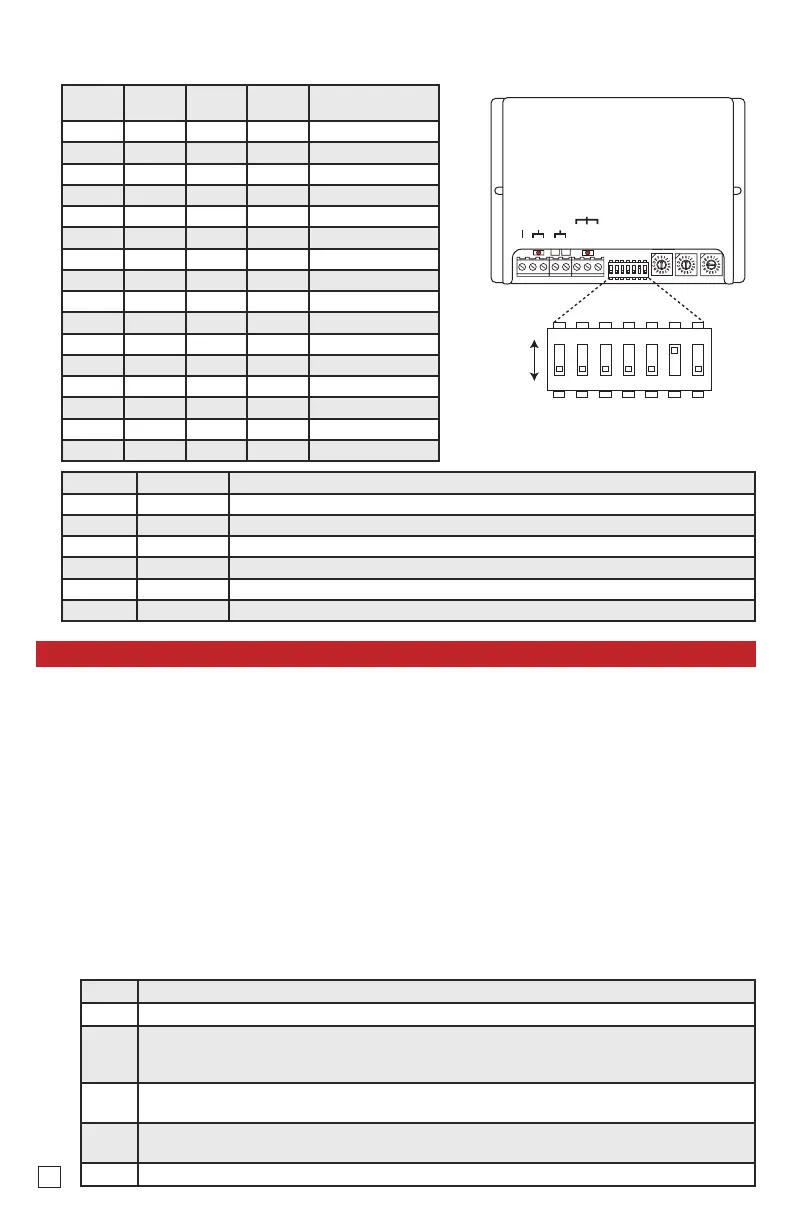
Note: DIP switches are shown in factory
default settings.
DIP switches 1-4 provide 16 different relay activation times according to the following table:
C. DIP Switch Settings
Switch Position Description
5 OFF Legacy Programming Mode (factory default)
5 ON Alternative Programming Mode
6 OFF Acknowledgement tones OFF
6 ON Acknowledgement tones ON (factory default)
7 OFF Auto-answer OFF (factory default)
7 ON Auto-answer ON
1. Accessing the RC-2A Remotely
Step 1. Set DIP switch 7 to ON and call the RC-2A using a Touch Tone phone.
Step 2. When the RC-2A answers, a single beep (acknowledgement tone) will be heard.
Step 3.
If the security access code has been disabled (one or more code switches set to D), go to step 4.
If a security access code has been set (no code switches set to D), enter "Q" followed by your 3
digit security access code (see page 3, A. Security Access Code).
Step 4.
Enter a two digit relay activation code (see page 5, C. Relay Activation Codes). A single or dou-
ble beep (acknowledgement tone) should be heard.
Step 5.
Enter "8" or "18" before hanging up to force the RC-2A to release the line. Alternatively, the unit
will disconnect if no Touch Tones are detected for 60 seconds.
Step 6. Set DIP switch 7 to the desired position.


 To Next Page
 Loading...


