17
EN
By pressing you move onto the previous item of the programming menu.
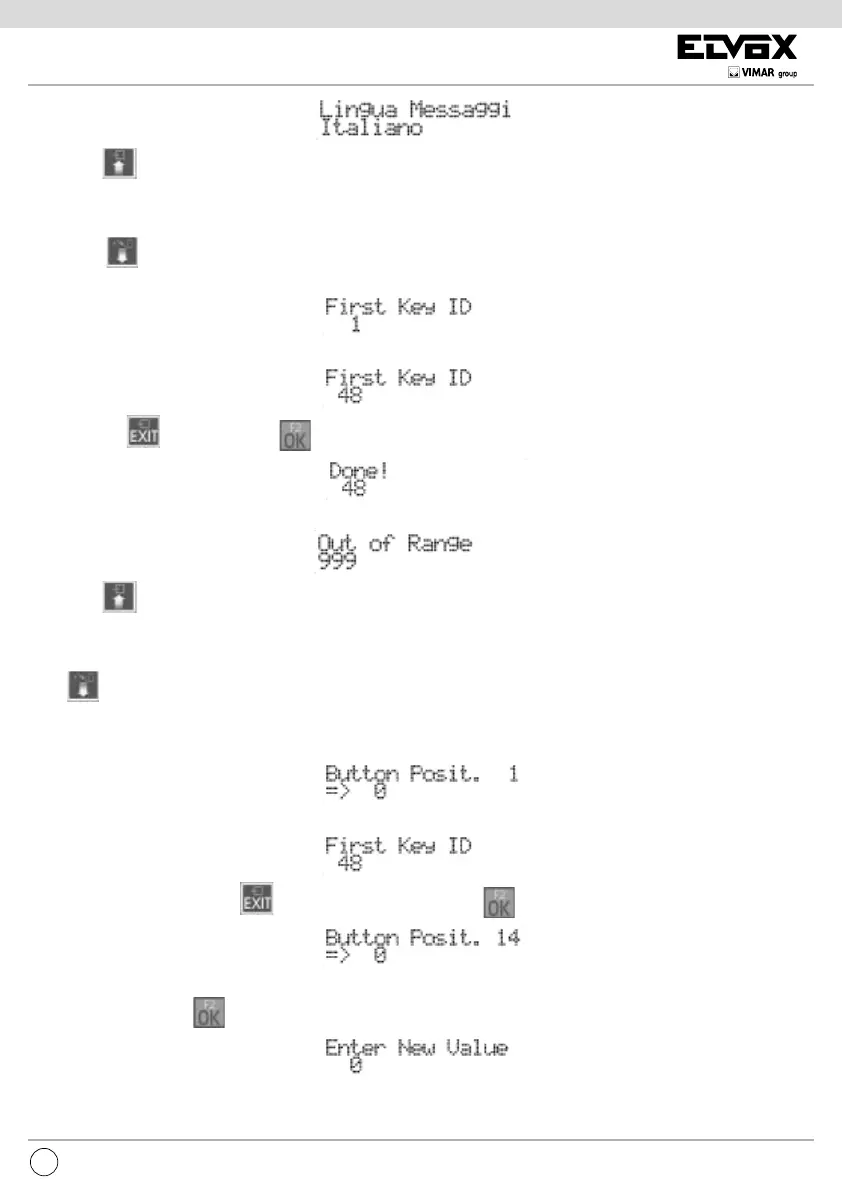
FIRST BUTTON ID
Press button to move to the next item by which you can change the number of the audio/video door entry unit called in correspond-
ence with the pushbutton CH1 of the speech unit.
To change the ID, enter a number between 1 and 200.
To cancel press . To conrm, press . Acceptance of the command, as in all cases, is shown on the rst line of the display
:
If the ID is outside the limit, the rst line of the display will signal the incongruity:
By pressing you move onto the previous item of the programming menu.
REMAPPING PUSHBUTTONS (HARDWARE / SOFTWARE CONVERSION)
Press to move to the next item by which you can change the number of the mointor called in correspondence with any pushbutton
of the speech unit. When programmed accordingly, the user can set the system so that several pushbuttons call the same intephone/
monitor. By default each pushbutton calls the intephone/ monitor door entry unit corresponding to the physical position on the keypad.
This is indicated by the value 0 on the conversion table:
To change the pushbutton to resign, press it directly or key in the digits so as to form a number between 1 and 200.
In the second case, to cancel press . To conrm the pushbutton, press .
To change mapping, press :
enter a number between 1 and 200.



 To Next Page