18
EN
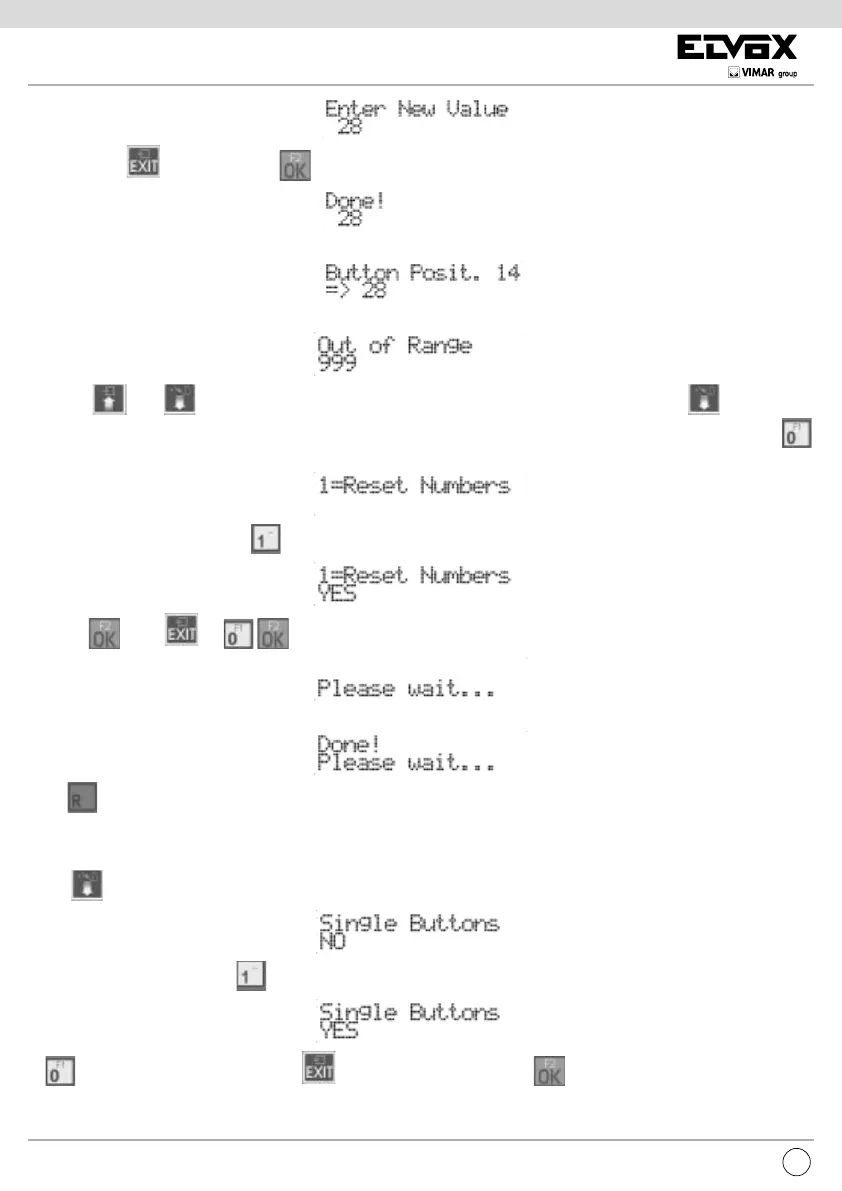
To cancel press . To conrm, press . Acceptance of the command, as in all cases, is shown on the rst line of the display:
Afterwards you go back to see the new programming value and you can continue with another pushbutton:
If the ID is outside the limit, the rst line of the display will signal the incongruity:
Use keys and to move from one pushbutton to another. From the position of pushbutton 1, press . to move to the
next item in the programming menu. To cancel all the remapping, instead of pressing a pushbutton or entering the number, press
:
You are asked to conrm by pressing :
and then
Press or to cancel the procedure. If remapping reset is selected, the following is displayed:
And at the end:
Press to pass quickly, skipping all the intermediate steps, onto the previous item of the programming menu.
SINGLE PUSHBUTTONS
Press to move to the next item by which you can choose from the pushbuttons on one (default) or two columns.
To change the conguration, press
for a single column:
or
for a double column. To cancel press . Programming is conrmed with :




 To Next Page