16
Vincent
CONNECTING A DIGITAL SOURCE
CONNECTING AN ANALOG SOURCE
General information:
Please make sure that the PF-1 should be already turned on when you connect devices. Switch on the
devices after connecting to the PF-1, otherwise there is a risk that the device disconnects.
Check, if the power supply is suitable for the device
at your home. Required voltage and frequency can
be read on the rear panel next to the power socket.
If the power supply is suitable, press the IEC connec-
CONNECTING THE POWER CORD
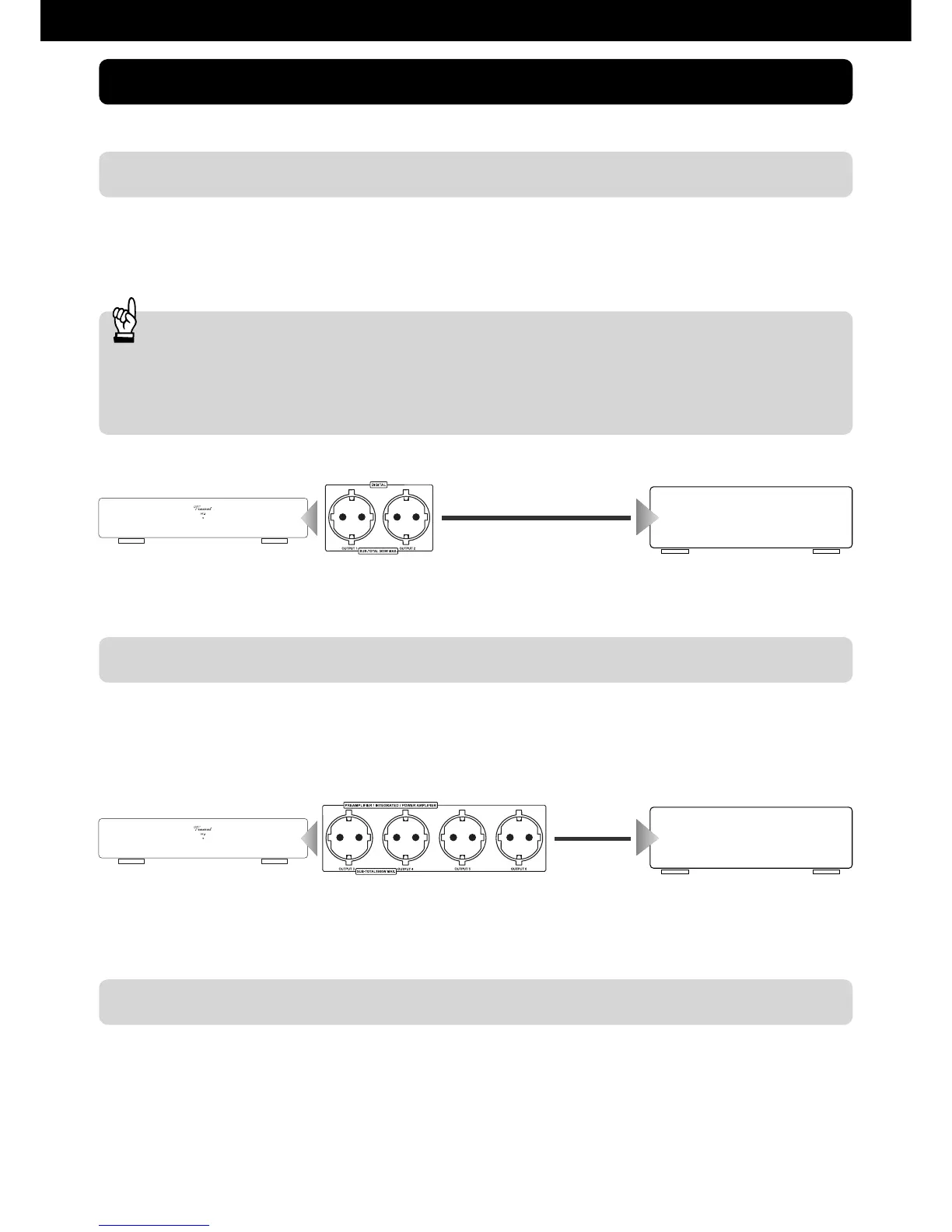
On the digital ports (2) You can connect up to two digital source devices (CD players, DVD players, etc.).
Therefore connect the Vincent PF-1 via power cord with your desired source device.
At the analogue ports (3) up to four analogue source devices (amplifier, preamplifier, and amplifier) can
be connected. Therefore, connect the Vincent PF-1 via power cord with your desired source device.
PF-1
CD-player,
DVD-player, etc.
Power cable
PF-1
Power cable
preamplifier,
amplifier, etc.
INSTALLATION
tor of the supplied power cord into the AC socket on
the rear panel. Connect the other end of the power
cord into an AC outlet.


 To Next Page