Troubleshooting
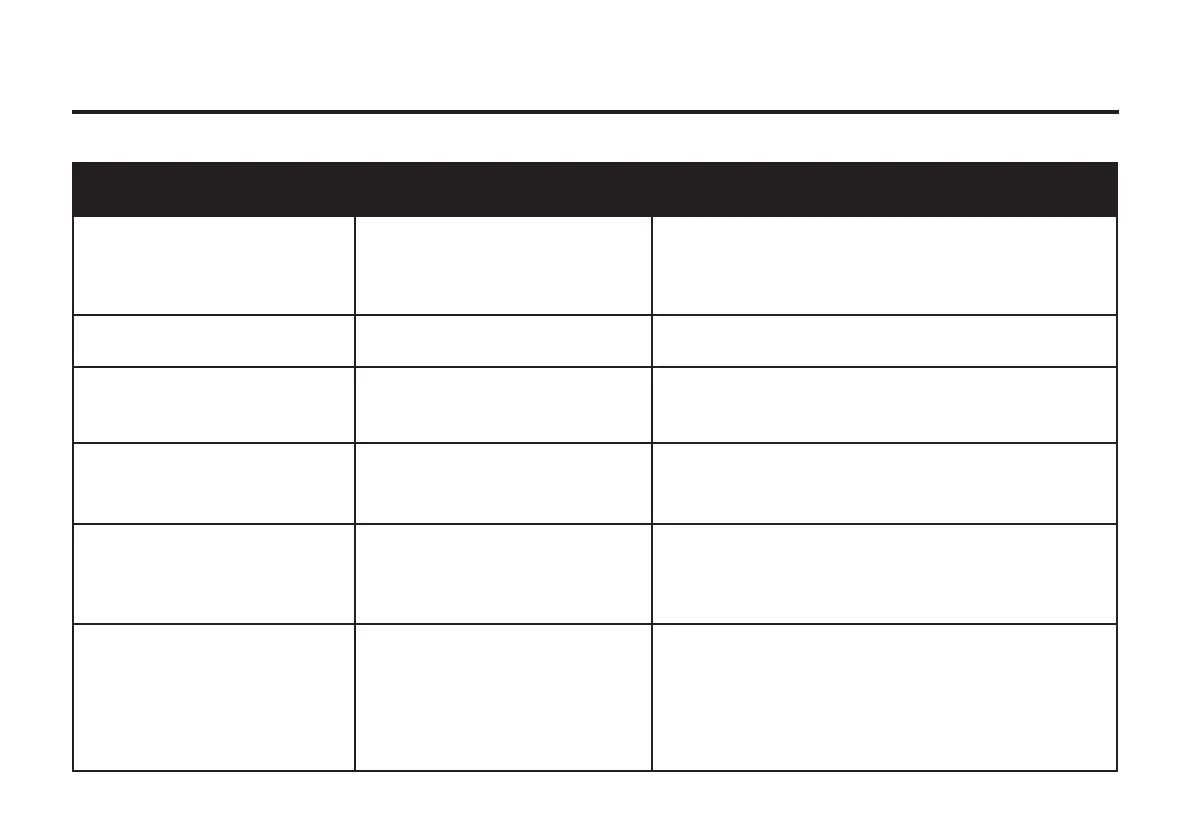
Malfunction Possible cause Remedy
No sound when power is on - No input sound source
- Volume knob in the lowest position
- Voice is switched o
- USB/SD is not inserted
- There is a signal on the Input line
- Adjust volume
- Turn on voice switch
- Insert a USB/SD Card
Sound distortion - Volume too loud
- Audio le error
- Turn down volume
- Check and modify the audio le
Microphone has no sound - Microphone socket not fully inserted
- Microphone switch is o
- Microphone volume in lowest
- Completely plug microphone socket
- Switch on microphone
- Adjust the microphone volume
No sound when playing USB/SD
media
- Tack format error
- Invalid operation causes malfunction
- USB/SD Card is not inserted properly
- Tack format should be MP3/WMA
- Switch the power o and then on
- Plug in USB/SD card properly
Problems with FM Radio - The radio channels can not be found
- FM radios has no sound
- Not enough FM channels
- Fuzzy FM radio sound
- FM antenna is not extended
- Switch to next Channel and try again
- Try installing the antenna at a dierent angle
- Try “Auto scan” mode
Large interference in the microphone - The Microphone is positioned too
close to the speaker
- Microphone on but not working
- Microphone volume is too loud
- Too close to the equipment which
interfere the speaker
- Do not lean microphones head against the speaker
- Turn o microphone when not in use
- Turn down microphone volume
- Do not install the speaker close to interfere sources


 To Next Page
 Loading...