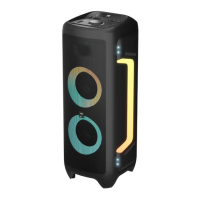
Need help?
Do you have a question about the Vipe NITRO X3 and is the answer not in the manual?
Use only a dry cloth for cleaning. Unplug the device before cleaning.
Do not expose to water droplets or splashes. Avoid placing liquids on the device.
Ensure ventilation slots are not blocked for proper operation and to prevent overheating.
Avoid overloading sockets to prevent fire or electric shock hazards.
Do not perform self-maintenance; rely on qualified personnel for repairs.
Keep away from hot surfaces and direct sunlight; avoid placing objects with flames nearby.
Remove batteries if unused long-term; handle leaking batteries safely.
List of items included in the package: User Manual, Remote, cables, antenna, adapter.
Guide to inserting/replacing remote battery and avoiding signal interference.
Product meets European and Russian safety and EMC standards.
Detailed technical data for the vipe NITRO X3 model, including power, response, and dimensions.
Detailed technical data for the vipe NITRO X3 Pro model, highlighting differences.
Visual overview of the speaker's control panel buttons and functions.
Visual overview of the remote control buttons and their numbering.
Adjusting microphone and echo volume levels on the speaker.
Switching input modes and controlling playback/TWS.
Skipping tracks, activating Nitro Bass, and adjusting bass volume.
Adjusting master volume, guitar volume, and treble volume.
Operating power, selecting light effects, and strobe functions.
Remote functions for power, TWS, previous/next track, and fast forward/backward.
Adjusting bass, echo, EQ modes, and Nitro Bass via remote.
Using remote for volume up/down, MIC volume, and mode selection.
Remote functions for play/pause, microphone priority, and light effects.
Visual identification of all ports and indicators on the speaker's rear panel.
Details on Audio Output, Type-C, FM Antenna, Power, AUX, Guitar, and Mic inputs.
Connecting power, charging the internal battery, and charging external devices.
Steps for Type-C playback and initiating Bluetooth connection.
Ensuring successful Bluetooth connection and automatic reconnection.
Connecting and adjusting microphones for karaoke and connecting a guitar.
Connecting audio via AUX and setting up True Wireless Stereo (TWS).
Information on service life, warranty period, and organization for claims.
Resolving problems related to no sound, sound distortion, and microphone issues.
Troubleshooting sound issues with USB/SD media and FM radio reception.
Addressing large interference when using the microphone.
Resolving issues with Bluetooth connection failures and dropped connections.
Troubleshooting steps for when the top panel controls become unresponsive.
 General
| Brand | Vipe |
|---|---|
| Model | NITRO X3 |
| Category | Stereo System |
| Language | English |

 To Next Page