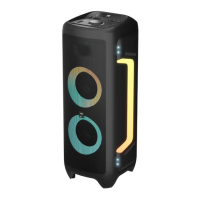
Microphone playback
Insert one microphone into the microphone socket on the rear
panel and adjust the microphone volume to a low level, using
the volume knob on the top panel or the “VOLUME DOWN” button
on remote control.
Adjust the microphone volume level to the desired level use
the microphone volume knob on the top panel, or the “VOLUME
UP” button on remote control. Enjoy the karaoke singing!
Guitar in connection
Connect a guitar to the party speaker directly via the 6.5 mm
Guitar input socket on the real panel.
AUX (line in)
Use the audio cable to connect the input terminal AUX-IN (line in)
on the rear panel of the unit, and connect the headphone socket
of your audio device. Press [MODE] button to switch to AUX-IN
(line in) when the display appears AUX-IN (line in).
To play music on your phone, turn on your audio device and
it starts playing.
TWS connection
TWS (true wireless stereo) Bluetooth connection is only used
between two identical speakers. Power on both speakers and select
Bluetooth mode.
Select one speaker and press “TWS” button to set MASTER speaker.
The second Speaker will congured as SLAVE speaker automatically.
Now turn to BT to play songs and enjoy the music in TWS mode.
on the device to be connected. The music system will synchronize
to play tracks from your device while the display show a “bL” sign
means that the connection has been successful.
The speaker will automatically reconnect when switch back on,
press [PLAY/PAUSE] to resume the playback.
The maximum distance between the audio system and the
connected device to ensure eective signal receipt is 10 meters.
If your phone receives a call while playing music in Bluetooth
mode, the playback is paused and will not sound during the call.
When the conversation is over, the device will reconnect and
playback will continue.
Battery charging operation
Use the AC power cord (included) to connect the device’s AC
power input connector to the AC power outlet. It is best to switch
on the unit before charging so that the display shows battery
charging status. While charging, the charging-indicator line on the
rear panel in red, when the three battery chargingindicator lines
stop ashing and become solid green light. This indicates that the
battery has been fully charged.
Charging status
• 3 battery capacity lines light illuminated = approx 100% full
charged, charging LED on rear panel shows green.
• 2 battery capacity lines light illuminated = app. 66.7% charge,
charging LED on rear panel shows red.
• 1 battery capacity line light illuminated = app. 33.3% charge
(indicates charging is required), chargin LED on rear panel
shows red.


 To Next Page
 Loading...