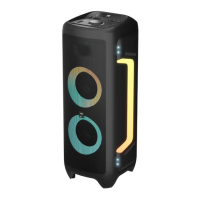
1. POWER ON/OFF
• Short press: Standby mode
• Long press: Power o the device
2. TWS
• Short press: TWS connection in bluetooth mode
• Long press: Strobe ashing light on/o
3. PREVIOUS
• Short press: Skip to the previous track
• Long press: Fast backward (FM station search in FM mode)
4. BASS
• Short press: Select Bass on/o
• Long press: Select echo mode
5. EQ
• Short press: Change the equalizer mode (8 modes)
• Long press: Select repeat one track /List cycle mode
6. NITRO BASS
• Short press: Press to a strong nitro bass
• Long press: Active voice prompts
7. MODE
• Short press: Select Bluetooth, LINE IN, Radio or USB mode
• Long press: LED on/o (circle light in front)
• Long press 15 sec: Check Bluetooth version
8. VOLUME UP
• Short press: Adjust the volume value of the speaker
• To adjust the volume value of the echo/ MIC when in echo/
MIC mode
9. PLAY/PLAUSE
• Short press: Play/plause mode (FM station search with
automatic storage in FM mode)
• Long press: Microphone priority in BT, USB, AUX-IN mode.
10. NEXT
• Short press: Skip to the next track
• Long press: Fast forward (FM station search in FM mode)
11.VOLUME DOWN
• Short press: Adjust the volume value of the speaker
• Adjust the volume value of the echo/ MIC when in echo/ MIC
mode.
12.TREBLE
• Short press: To select Treble on/o
• Long press: To select MIC mode, then press VOL± to turn up/
down mic volume
13. Light
• Short press: Select light color change (6 colors and Auto color)
for circle light in front
• Long press: Select lighting mode (3 modes: Flashing, Racing
and Breathing)
Remote control (RC) (g. 2)


 To Next Page
 Loading...