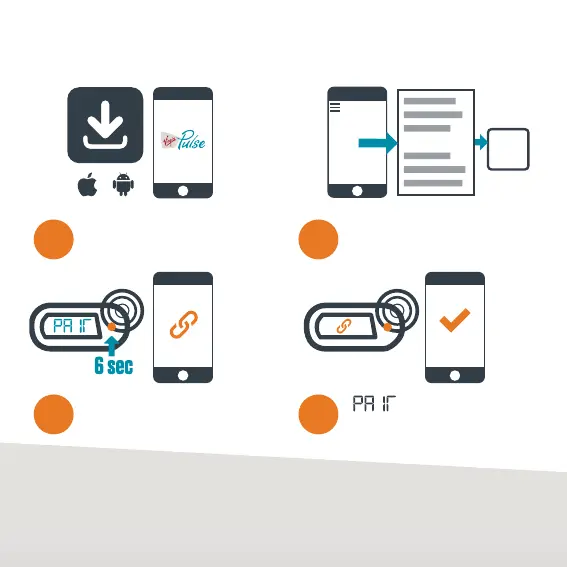
SYNC MODE SET-UP
MY DEVICE
SYNC
MODE
SUCCESS
1 2
43
Download the latest ‘Virgin Pulse
Global Challenge’ app.
Hold down the Pulse
button for up to 6 seconds.
Open the app > Menu
> My Device > Sync Mode.
displays on your
Pulse, then ‘Pairing successful’
displays on the app.*
TO SWITCH TO STANDARD MODE:
1. Take note of your current step count and sync your Pulse to avoid losing activity.
2. Press Factory Reset (see page 2, fig. 8) to switch to Standard mode.
*REPEAT STEPS IF SYNC MODE SET-UP IS UNSUCCESSFUL.
4


 To Next Page