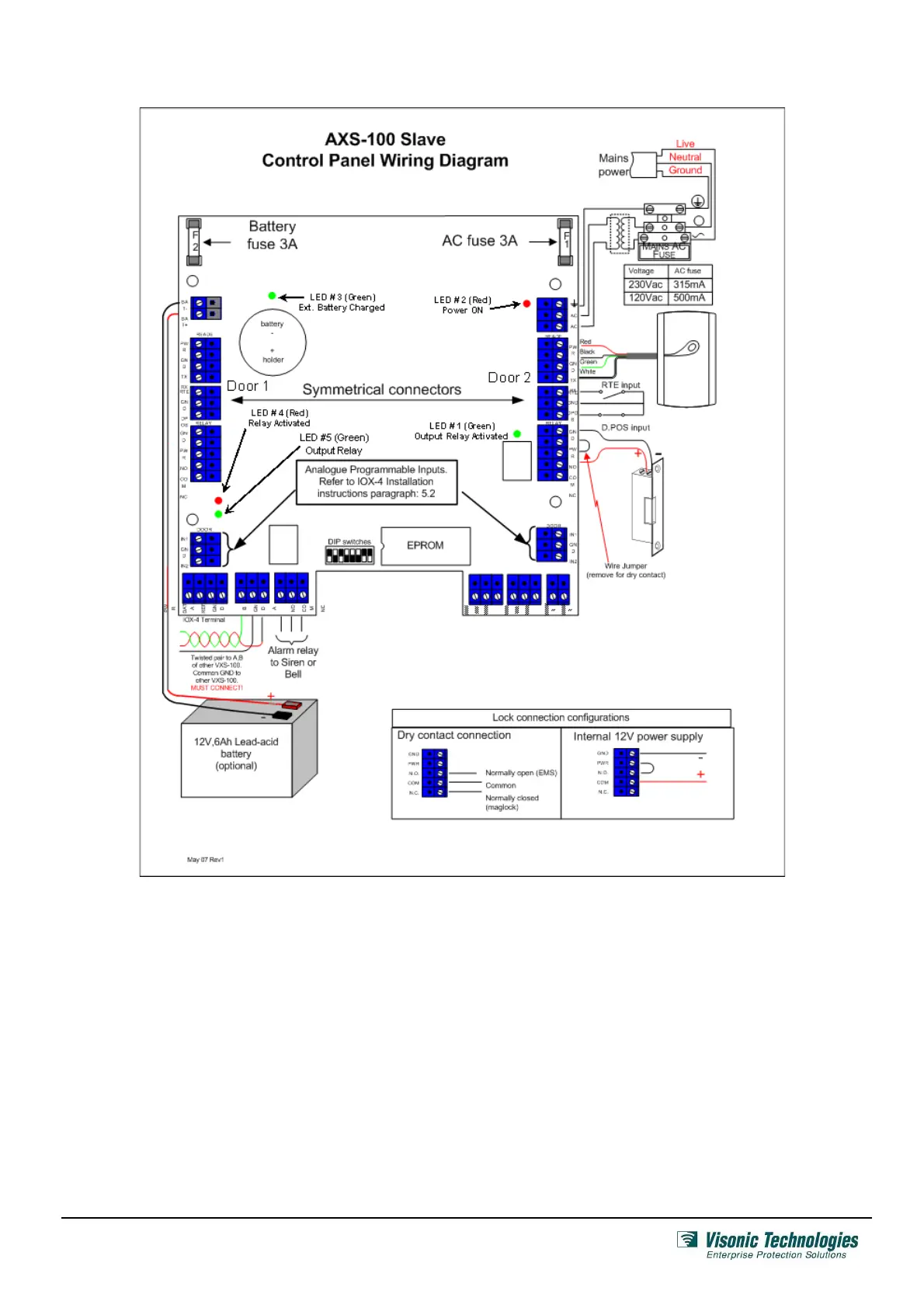
2. Panel Wiring
A. Proximity Readers
Each Slave Controller can be connected to two proximity readers:
Each reader is connected to the controller via a 4-wire cable.
The standard cable is color coded as follows:
• RED Power +
• BLACK Power –
• GREENTX
• WHITE RX
Use extension cables with the same colors to avoid connection
errors.
Note 1: Installing a RDR-4 on a metal surface or a metal door
frame significantly decreases read range. If the reader must be
installed on a metal surface, use the RDR-BACK so that the
reader will be at least 1 cm (3/8 in.) away from the metal material
Note 2: When installing more than one RDR-4, the distance
between them should be at least 60 cm (2 ft.), to ensure proper
operation.
B. Inputs
Each AXS-100 Slave Controller can be connected to two inputs
per door as described below:
• Request-to-Exit (RTE) button or PIR: Installed near the
door in the secure area will allow a person to open the door
from within for leaving.
• Door Position micro switch: Installed between the door
and door frame will provide the controller with door status
indications.
Both the RTE and the Door Position inputs can be connected to
either normally open or normally closed switches. The default is a
normally open RTE and normally closed Door Position (when the
door is shut).
Page 3 of 6
DE62821A_V7.0



 To Next Page