
 Need help?
Do you have a question about the Viscount Viva X and is the answer not in the manual?
Alerts users to electric shock risks and warns against opening the product enclosure.
Lists 15 essential safety precautions for operation, including water proximity, ventilation, and maintenance.
Advises on avoiding extreme temperatures, moisture, dust, and magnetic interference for optimal placement.
Covers power connection best practices and cleaning methods, noting no user-serviceable parts.
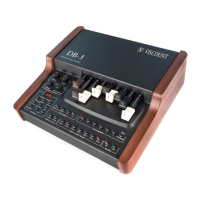
Describes the main volume fader, layer volume faders, and keys for layer selection.
Details the 3-digit display, data entry encoder, and keys for SPLIT, TRANSPOSE, STORE, PERFORMANCE, and EDIT modes.
Explains the function of SPLIT, TRANSPOSE, and STORE keys for performance editing.
Describes how to switch between Performance and Edit modes for parameter modification.
Guides users on selecting instrument sounds (timbres) from various categories like pianos, strings, and organs.
Explains the 99 available Performances, including factory presets and user-editable slots.
Details entering Edit Mode, modifying parameters, and saving changes to a target performance.
Covers immediate feedback on edits and how to adjust the instrument's overall tuning (pitch).
Describes how to control the Reverb, Chorus, and Brilliance effects for each sound layer.
Explains dynamic response curves and octave transposition settings for sound shaping.
Details octave transposition and MIDI output channel settings.
Explains how to set Bank Select (MSB/LSB) and Program Change values for MIDI communication.
Explains the different modes for the MIDI IN port (OFF, SYSTEM, SOFT-THRU, SOUND, EXCLUSION).
Covers setting the MIDI receive channel and performing bulk data transfer for memory backup.
Details the AC power input, MIDI ports, and connectors for expression and sustain pedals.
Describes the stereo/mono audio outputs and the headphone connection port.
 General
| Effects | Reverb, Chorus |
|---|---|
| Recorder | Yes |
| Connectivity | USB |
| Display | LCD |
| Weight | Varies by configuration |
| Power Supply | AC power |









 To Next Page