13
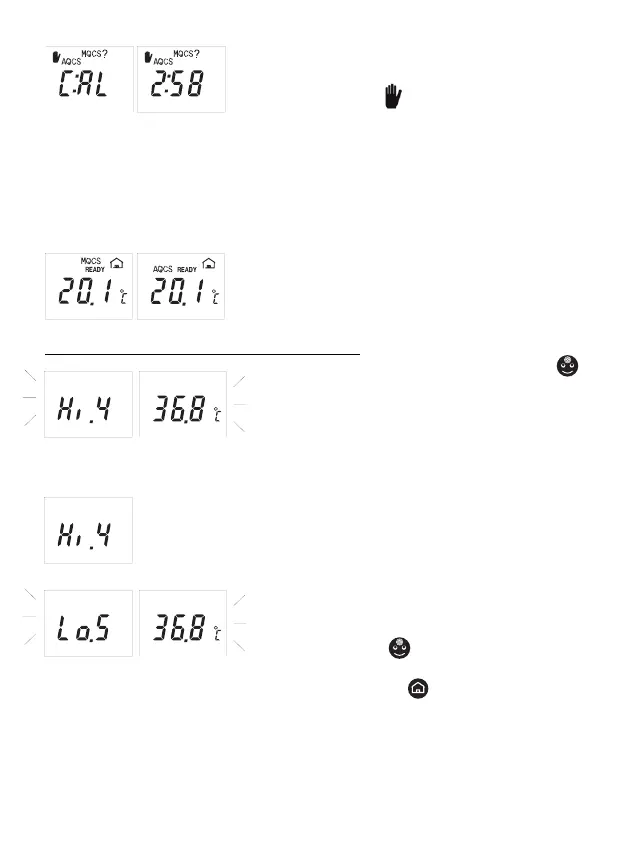
DESCRIPTION: the display shows a countdown (in
minutes and seconds) and/or C:AL, a pictogram of a
hand inviting to stop
minutes and seconds) and/or C:AL, a pictogram of
, and the messages AQCS
and MQCS?
PROBLEM: the thermometer has not stabilized. The
symbols prompt you to choose between:
SOLUTION:
- wait until the AQCS countdown has run its course
without touching the thermometer, or
- perform an MQCS (par. #8).
DESCRIPTION: while in stand-by mode, the room
temperature displayed is accompanied by the symbol
MQCS or AQCS.
MEANING: the thermometer has undergone quick
automatic or manual calibration.
Messages about room temperature working range
DESCRIPTION: when you press the “face”
button, the projection/display shows “Hi.4” and the
value alternately.
PROBLEM: the room temperature is between
40,1 and 45,0°C (104.1 and 113.1ºF).
SOLUTION: the temperature reading can be taken
but accuracy is not guaranteed.
DESCRIPTION: the projection/display shows “Hi.4”.
PROBLEM: the room temperature is too high (above 45,0°C/113.0°F).
SOLUTION: move to another, cooler site and, if you are taking the
body temperature, wait for the stabilization of the device and of the
subject.
DESCRIPTION: the projection/display shows
«Lo.5» and the value alternately.
PROBLEM:
- reading with “face”
button: the room tempera-
ture is between 10,0 and 15,9°C (50.0 and 60.6ºF).
- reading with “home”
button: the room tem-
perature is between 5 and 9,9°C (41 and 48.2ºF).
SOLUTION: the temperature reading can be taken
but accuracy is not guaranteed..


 To Next Page